<!DOCTYPE html>
	<html lang="vi" xmlns="http://www.w3.org/1999/xhtml" prefix="og: http://ogp.me/ns#">
	<head>
<title>Import Excel File Data into MySQL Database using PHP</title>
<meta name="description" content="Import Excel File Data into MySQL Database using PHP - Savefile - Tin Tức -...">
<meta name="author" content="PHAN MEM THIEN HA">
<meta name="copyright" content="PHAN MEM THIEN HA [phamhuy842005@gmail.com]">
<meta name="robots" content="index, archive, follow, noodp">
<meta name="googlebot" content="index,archive,follow,noodp">
<meta name="msnbot" content="all,index,follow">
<meta name="generator" content="NukeViet v4.0">
<meta name="viewport" content="width=device-width, initial-scale=1">
<meta http-equiv="Content-Type" content="text/html; charset=utf-8">
<meta property="og:title" content="Import Excel File Data into MySQL Database using PHP">
<meta property="og:type" content="website">
<meta property="og:description" content="Savefile - Tin Tức - http&#x3A;&#x002F;&#x002F;thienhashop.com&#x002F;news&#x002F;savefile&#x002F;huong-dan-phan-mem&#x002F;import-excel-file-data-into-mysql-database-using-php-210.html">
<meta property="og:site_name" content="PHAN MEM THIEN HA">
<meta property="og:url" content="http://phanmemthienha.com/news/huong-dan-phan-mem/import-excel-file-data-into-mysql-database-using-php-210.html">
<link rel="shortcut icon" href="http://thienhashop.com/uploads/logo-shop-thien-ha-5.png">
<link rel="canonical" href="http://phanmemthienha.com/news/huong-dan-phan-mem/import-excel-file-data-into-mysql-database-using-php-210.html">
<link rel="alternate" href="http://thienhashop.com/news/rss/" title="Tin Tức" type="application/rss+xml">
<link rel="alternate" href="http://thienhashop.com/news/rss/huong-dan-phan-mem/" title="Tin Tức - Hướng dẫn phần mềm" type="application/rss+xml">
<link rel="alternate" href="http://thienhashop.com/news/rss/huong-dan-noi-bo/" title="Tin Tức - Hướng dẫn nội bộ" type="application/rss+xml">
<link rel="alternate" href="http://thienhashop.com/news/rss/Doi-tac/" title="Tin Tức - Đối tác" type="application/rss+xml">
<link rel="alternate" href="http://thienhashop.com/news/rss/Tuyen-dung/" title="Tin Tức - Tuyển dụng" type="application/rss+xml">
<link rel="preload" as="script" href="http://thienhashop.com/assets/js/jquery/jquery.min.js">
<link rel="preload" as="script" href="http://thienhashop.com/assets/js/language/vi.js">
<link rel="preload" as="script" href="http://thienhashop.com/assets/js/global.js">
<link rel="preload" as="script" href="http://thienhashop.com/themes/default/js/news.js">
<link rel="preload" as="script" href="http://thienhashop.com/themes/popovleather/js/main.js">
<link rel="preload" as="script" href="http://thienhashop.com/themes/popovleather/js/bootstrap.min.js">
<link rel="StyleSheet" href="http://thienhashop.com/assets/css/font-awesome.min.css">
<link rel="StyleSheet" href="http://thienhashop.com/themes/popovleather/css/bootstrap.min.css">
<link rel="StyleSheet" href="http://thienhashop.com/themes/popovleather/css/style.css">
<link rel="StyleSheet" href="http://thienhashop.com/themes/popovleather/css/style.responsive.css">
<link rel="StyleSheet" href="http://thienhashop.com/themes/default/css/news.css">
<link rel="StyleSheet" href="http://thienhashop.com/assets/css/popovleather.vi.0.css?t=87">
<style>
	body{background: #fff;}
</style>
	</head>
	<body>
<div id="print">
	<div id="hd_print">
		<h2 class="pull-left">PHAN MEM THIEN HA</h2>
		<p class="pull-right"><a title="PHAN MEM THIEN HA" href="http://thienhashop.com/">http://thienhashop.com</a></p>
	</div>
	<div class="clear"></div>
	<hr />
	<div id="content">
		<h1>Import Excel File Data into MySQL Database using PHP</h1>
		<ul class="list-inline">
			<li>Thứ hai - 05/02/2024 11:10</li>
			<li class="hidden-print txtrequired"><em class="fa fa-print">&nbsp;</em><a title="In ra" href="javascript:;" onclick="window.print()">In ra</a></li>
			<li class="hidden-print txtrequired"><em class="fa fa-power-off">&nbsp;</em><a title="Đóng cửa sổ này" href="javascript:;" onclick="window.close()">Đóng cửa sổ này</a></li>
		</ul>
		<div class="clear"></div>
		<div id="hometext">
			Import Excel File Data into MySQL Database using PHP
		</div>
				<div class="imghome">
			<img alt="Import Excel File Data into MySQL Database using PHP" src="https://www.codexworld.com/wp-content/uploads/2023/04/sample-excel-file-format-import-codexworld.png" width="460" class="img-thumbnail" />
		</div>
		<div class="clear"></div>
		<div id="bodytext" class="clearfix">
			Import Excel File Data into MySQL Database using PHP<br  />
&nbsp;
<p><b>Excel</b> is a spreadsheet used to store data in tabular form. In the web application, the Excel file format is used mainly for 2 purposes, import and export data. The import feature helps to parse data from Excel files and insert data in the database. On the other hand, the Export feature used to download data from the database and save it as a file.</p>

<p>Generally, you need to insert data one by one manually to add records to the database. But, when there are a large number of records that need to be inserted in the database, it’s very time-consuming to insert data manually. The import feature is a useful option to insert bulk data into the database at once dynamically. In this tutorial, we will show you how to <b>import data from Excel</b> file and insert into the database using PHP.</p>

<p>In this example script, we will import members’ data from an Excel file in the database using PHP and MySQL.</p>

<ul>
	<li>Upload Excel file with HTML and PHP.</li>
	<li>Read and parse data from Excel files with PHP.</li>
	<li>Insert data in the database with PHP and MySQL.</li>
</ul>

<h2>Create Database Table</h2>

<p>To store the member’s data, a table is required in the database. The following SQL creates a <code>members</code> table with some basic fields in the MySQL database.</p>

<pre>
CREATE TABLE `members` (
  `id` int(11) NOT NULL AUTO_INCREMENT,
  `first_name` varchar(50) COLLATE utf8_unicode_ci NOT NULL,
  `last_name` varchar(50) COLLATE utf8_unicode_ci NOT NULL,
  `email` varchar(50) COLLATE utf8_unicode_ci NOT NULL,
  `phone` varchar(15) COLLATE utf8_unicode_ci DEFAULT NULL,
  `created` datetime NOT NULL,
  `modified` datetime NOT NULL,
  `status` enum(&#039;Active&#039;,&#039;Inactive&#039;) COLLATE utf8_unicode_ci NOT NULL DEFAULT &#039;Active&#039;,
  PRIMARY KEY (`id`)
) ENGINE=InnoDB DEFAULT CHARSET=utf8 COLLATE=utf8_unicode_ci;</pre>

<h2>Excel File Format</h2>

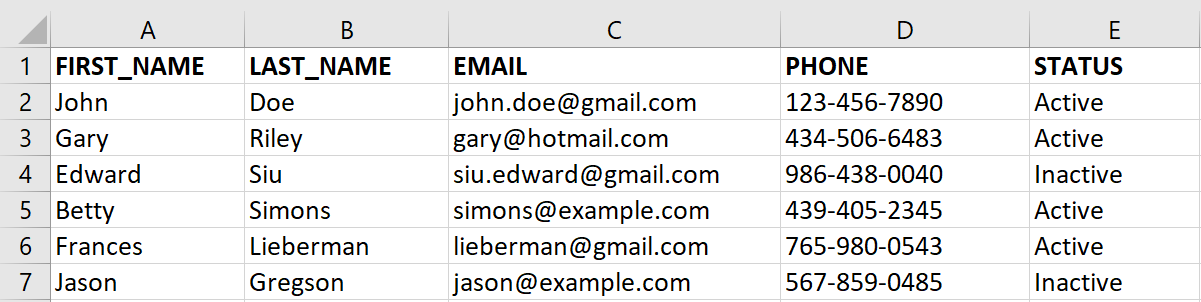
<p>Based on the database table structure, the Excel file should have these fields – First Name, Last Name, Email, Phone, and Status. To import the data from Excel file, the data format should be similar to the following screen.</p>
<img alt="sample-excel-file-format-import-codexworld" decoding="async" fetchpriority="high" height="302" sizes="(max-width: 1201px) 100vw, 1201px" src="https://www.codexworld.com/wp-content/uploads/2023/04/sample-excel-file-format-import-codexworld.png" srcset="https://www.codexworld.com/wp-content/uploads/2023/04/sample-excel-file-format-import-codexworld.png 1201w, https://www.codexworld.com/wp-content/uploads/2023/04/sample-excel-file-format-import-codexworld-300x75.png 300w, https://www.codexworld.com/wp-content/uploads/2023/04/sample-excel-file-format-import-codexworld-1024x257.png 1024w, https://www.codexworld.com/wp-content/uploads/2023/04/sample-excel-file-format-import-codexworld-768x193.png 768w, https://www.codexworld.com/wp-content/uploads/2023/04/sample-excel-file-format-import-codexworld-350x88.png 350w, https://www.codexworld.com/wp-content/uploads/2023/04/sample-excel-file-format-import-codexworld-320x80.png 320w, https://www.codexworld.com/wp-content/uploads/2023/04/sample-excel-file-format-import-codexworld-380x96.png 380w" width="1201" />
<h2>PhpSpreadsheet Library</h2>

<p>We will use the <b>PhpSpreadsheet library</b> to read Excel files and parse data. The PhpSpreadsheet is a PHP library that helps to parse data from spreadsheet file formats (.xls, .xlsx, etc).</p>

<p>Use composer to install PhpSpreadsheet in the script folder.</p>

<pre>
composer require phpoffice/phpspreadsheet</pre>

<p>Alternatively, you can use our source code to install PhpSpreadsheet without composer.</p>

<p>Note that: All the required files including the PhpSpreadsheet library are included in our source code, you do not require to install it separately.</p>

<p>Before getting started, look at the file structure of the <b>Excel data import in PHP</b> script.</p>

<pre>
import_excel_data_with_php/
├── dbConnect.php
├── index.php
├── importData.php
├── vendor/
├── assets/
    └── css/
        ├── bootstrap.min.css
        └── style.css
</pre>

<h2>Database Configuration (dbConfig.php)</h2>

<p>The <code>dbConfig.php</code> is used to connect and select the database. Specify the database host (<code>$dbHost</code>), username (<code>$dbUsername</code>), password (<code>$dbPassword</code>), and name (<code>$dbName</code>) as per your MySQL database credentials.</p>

<pre>
&lt;?php 
//&nbsp;Database&nbsp;configuration 
$dbHost&nbsp;&nbsp;&nbsp;&nbsp;&nbsp;=&nbsp;&quot;localhost&quot;; 
$dbUsername&nbsp;=&nbsp;&quot;root&quot;; 
$dbPassword&nbsp;=&nbsp;&quot;root&quot;; 
$dbName&nbsp;&nbsp;&nbsp;&nbsp;&nbsp;=&nbsp;&quot;codexworld_db&quot;; 
//&nbsp;Create&nbsp;database&nbsp;connection 
$db&nbsp;=&nbsp;new&nbsp;mysqli($dbHost,&nbsp;$dbUsername,&nbsp;$dbPassword,&nbsp;$dbName); 
//&nbsp;Check&nbsp;connection 
if&nbsp;($db-&gt;connect_error)&nbsp;{ 
&nbsp;&nbsp;&nbsp;&nbsp;die(&quot;Connection&nbsp;failed:&nbsp;&quot;&nbsp;.&nbsp;$db-&gt;connect_error); 
} 
?&gt;</pre>

<h2>Excel File Upload (index.php)</h2>

<p>Initially, the existing member’s data is listed with the Excel file import option.</p>

<ul>
	<li>Existing members’ data are fetched from the database and listed on the webpage.</li>
	<li>An Import Excel button is placed at the top of the list.</li>
	<li>By clicking the Import button, an HTML form appears to select and upload an Excel file.</li>
	<li>On submission, the form is submitted to the server-side script (importData.php) to process the Excel data import functionality.</li>
	<li><b>formToggle()</b> – It is a JavaScript function that helps to Show/Hide the Excel file upload form. This function is triggered on the click event of the Import button.</li>
</ul>

<p>If the form is already submitted,</p>

<ul>
	<li>The status message is retrieved from the URL and the import status is displayed on the web page.</li>
</ul>

<pre>
&lt;?php 
//&nbsp;Load&nbsp;the&nbsp;database&nbsp;configuration&nbsp;file 
include_once&nbsp;&#039;dbConfig.php&#039;; 
//&nbsp;Get&nbsp;status&nbsp;message 
if(!empty($_GET&#91;&#039;status&#039;&#93;)){ 
&nbsp;&nbsp;&nbsp;&nbsp;switch($_GET&#91;&#039;status&#039;&#93;){ 
&nbsp;&nbsp;&nbsp;&nbsp;&nbsp;&nbsp;&nbsp;&nbsp;case&nbsp;&#039;succ&#039;: 
&nbsp;&nbsp;&nbsp;&nbsp;&nbsp;&nbsp;&nbsp;&nbsp;&nbsp;&nbsp;&nbsp;&nbsp;$statusType&nbsp;=&nbsp;&#039;alert-success&#039;; 
&nbsp;&nbsp;&nbsp;&nbsp;&nbsp;&nbsp;&nbsp;&nbsp;&nbsp;&nbsp;&nbsp;&nbsp;$statusMsg&nbsp;=&nbsp;&#039;Member&nbsp;data&nbsp;has&nbsp;been&nbsp;imported&nbsp;successfully.&#039;; 
&nbsp;&nbsp;&nbsp;&nbsp;&nbsp;&nbsp;&nbsp;&nbsp;&nbsp;&nbsp;&nbsp;&nbsp;break; 
&nbsp;&nbsp;&nbsp;&nbsp;&nbsp;&nbsp;&nbsp;&nbsp;case&nbsp;&#039;err&#039;: 
&nbsp;&nbsp;&nbsp;&nbsp;&nbsp;&nbsp;&nbsp;&nbsp;&nbsp;&nbsp;&nbsp;&nbsp;$statusType&nbsp;=&nbsp;&#039;alert-danger&#039;; 
&nbsp;&nbsp;&nbsp;&nbsp;&nbsp;&nbsp;&nbsp;&nbsp;&nbsp;&nbsp;&nbsp;&nbsp;$statusMsg&nbsp;=&nbsp;&#039;Something&nbsp;went&nbsp;wrong,&nbsp;please&nbsp;try&nbsp;again.&#039;; 
&nbsp;&nbsp;&nbsp;&nbsp;&nbsp;&nbsp;&nbsp;&nbsp;&nbsp;&nbsp;&nbsp;&nbsp;break; 
&nbsp;&nbsp;&nbsp;&nbsp;&nbsp;&nbsp;&nbsp;&nbsp;case&nbsp;&#039;invalid_file&#039;: 
&nbsp;&nbsp;&nbsp;&nbsp;&nbsp;&nbsp;&nbsp;&nbsp;&nbsp;&nbsp;&nbsp;&nbsp;$statusType&nbsp;=&nbsp;&#039;alert-danger&#039;; 
&nbsp;&nbsp;&nbsp;&nbsp;&nbsp;&nbsp;&nbsp;&nbsp;&nbsp;&nbsp;&nbsp;&nbsp;$statusMsg&nbsp;=&nbsp;&#039;Please&nbsp;upload&nbsp;a&nbsp;valid&nbsp;Excel&nbsp;file.&#039;; 
&nbsp;&nbsp;&nbsp;&nbsp;&nbsp;&nbsp;&nbsp;&nbsp;&nbsp;&nbsp;&nbsp;&nbsp;break; 
&nbsp;&nbsp;&nbsp;&nbsp;&nbsp;&nbsp;&nbsp;&nbsp;default: 
&nbsp;&nbsp;&nbsp;&nbsp;&nbsp;&nbsp;&nbsp;&nbsp;&nbsp;&nbsp;&nbsp;&nbsp;$statusType&nbsp;=&nbsp;&#039;&#039;; 
&nbsp;&nbsp;&nbsp;&nbsp;&nbsp;&nbsp;&nbsp;&nbsp;&nbsp;&nbsp;&nbsp;&nbsp;$statusMsg&nbsp;=&nbsp;&#039;&#039;; 
&nbsp;&nbsp;&nbsp;&nbsp;} 
} 
?&gt;

&lt;!DOCTYPE html&gt;
&lt;html lang=&quot;en&quot;&gt;
&lt;head&gt;
&lt;meta charset=&quot;utf-8&quot;&gt;
&lt;title&gt;Import Excel File Data with PHP&lt;/title&gt;

&lt;!-- Bootstrap library --&gt;
&lt;link rel=&quot;stylesheet&quot; href=&quot;assets/css/bootstrap.min.css&quot;&gt;

&lt;!-- Stylesheet file --&gt;
&lt;link rel=&quot;stylesheet&quot; href=&quot;assets/css/style.css&quot;&gt;
&lt;!-- Show/hide Excel file upload form --&gt;
&lt;script&gt;
function formToggle(ID){
    var element = document.getElementById(ID);
    if(element.style.display === &quot;none&quot;){
        element.style.display = &quot;block&quot;;
    }else{
        element.style.display = &quot;none&quot;;
    }
}
&lt;/script&gt;
&lt;/head&gt;
&lt;body&gt;

&lt;!-- Display status message --&gt;
&lt;?php&nbsp;if(!empty($statusMsg)){&nbsp;?&gt;
&lt;div class=&quot;col-xs-12 p-3&quot;&gt;
    &lt;div class=&quot;alert &lt;?php&nbsp;echo&nbsp;$statusType;&nbsp;?&gt;&quot;&gt;&lt;?php&nbsp;echo&nbsp;$statusMsg;&nbsp;?&gt;&lt;/div&gt;
&lt;/div&gt;
&lt;?php&nbsp;}&nbsp;?&gt;

&lt;div class=&quot;row p-3&quot;&gt;
    &lt;!-- Import link --&gt;
    &lt;div class=&quot;col-md-12 head&quot;&gt;
        &lt;div class=&quot;float-end&quot;&gt;
            &lt;a href=&quot;javascript:void(0);&quot; class=&quot;btn btn-success&quot; onclick=&quot;formToggle(&#039;importFrm&#039;);&quot;&gt;&lt;i class=&quot;plus&quot;&gt;&lt;/i&gt; Import Excel&lt;/a&gt;
        &lt;/div&gt;
    &lt;/div&gt;
    &lt;!-- Excel file upload form --&gt;
    &lt;div class=&quot;col-md-12&quot; id=&quot;importFrm&quot; style=&quot;display: none;&quot;&gt;
        &lt;form class=&quot;row g-3&quot; action=&quot;importData.php&quot; method=&quot;post&quot; enctype=&quot;multipart/form-data&quot;&gt;
            &lt;div class=&quot;col-auto&quot;&gt;
                &lt;label for=&quot;fileInput&quot; class=&quot;visually-hidden&quot;&gt;File&lt;/label&gt;
                &lt;input type=&quot;file&quot; class=&quot;form-control&quot; name=&quot;file&quot; id=&quot;fileInput&quot; /&gt;
            &lt;/div&gt;
            &lt;div class=&quot;col-auto&quot;&gt;
                &lt;input type=&quot;submit&quot; class=&quot;btn btn-primary mb-3&quot; name=&quot;importSubmit&quot; value=&quot;Import&quot;&gt;
            &lt;/div&gt;
        &lt;/form&gt;
    &lt;/div&gt;

    &lt;!-- Data list table --&gt; 
    &lt;table class=&quot;table table-striped table-bordered&quot;&gt;
        &lt;thead class=&quot;table-dark&quot;&gt;
            &lt;tr&gt;
                &lt;th&gt;#&lt;/th&gt;
                &lt;th&gt;First Name&lt;/th&gt;
                &lt;th&gt;Last Name&lt;/th&gt;
                &lt;th&gt;Email&lt;/th&gt;
                &lt;th&gt;Phone&lt;/th&gt;
                &lt;th&gt;Status&lt;/th&gt;
                &lt;th&gt;Created&lt;/th&gt;
            &lt;/tr&gt;
        &lt;/thead&gt;
        &lt;tbody&gt;
&nbsp;&nbsp;&nbsp;&nbsp;&nbsp;&nbsp;&nbsp;&nbsp;&lt;?php 
&nbsp;&nbsp;&nbsp;&nbsp;&nbsp;&nbsp;&nbsp;&nbsp;//&nbsp;Get&nbsp;member&nbsp;rows 
&nbsp;&nbsp;&nbsp;&nbsp;&nbsp;&nbsp;&nbsp;&nbsp;$result&nbsp;=&nbsp;$db-&gt;query(&quot;SELECT&nbsp;*&nbsp;FROM&nbsp;members&nbsp;ORDER&nbsp;BY&nbsp;id&nbsp;DESC&quot;); 
&nbsp;&nbsp;&nbsp;&nbsp;&nbsp;&nbsp;&nbsp;&nbsp;if($result-&gt;num_rows&nbsp;&gt;&nbsp;0){&nbsp;$i=0; 
&nbsp;&nbsp;&nbsp;&nbsp;&nbsp;&nbsp;&nbsp;&nbsp;&nbsp;&nbsp;&nbsp;&nbsp;while($row&nbsp;=&nbsp;$result-&gt;fetch_assoc()){&nbsp;$i++; 
&nbsp;&nbsp;&nbsp;&nbsp;&nbsp;&nbsp;&nbsp;&nbsp;?&gt;
            &lt;tr&gt;
                &lt;td&gt;&lt;?php&nbsp;echo&nbsp;$i;&nbsp;?&gt;&lt;/td&gt;
                &lt;td&gt;&lt;?php&nbsp;echo&nbsp;$row&#91;&#039;first_name&#039;&#93;;&nbsp;?&gt;&lt;/td&gt;
                &lt;td&gt;&lt;?php&nbsp;echo&nbsp;$row&#91;&#039;last_name&#039;&#93;;&nbsp;?&gt;&lt;/td&gt;
                &lt;td&gt;&lt;?php&nbsp;echo&nbsp;$row&#91;&#039;email&#039;&#93;;&nbsp;?&gt;&lt;/td&gt;
                &lt;td&gt;&lt;?php&nbsp;echo&nbsp;$row&#91;&#039;phone&#039;&#93;;&nbsp;?&gt;&lt;/td&gt;
                &lt;td&gt;&lt;?php&nbsp;echo&nbsp;$row&#91;&#039;status&#039;&#93;;&nbsp;?&gt;&lt;/td&gt;
                &lt;td&gt;&lt;?php&nbsp;echo&nbsp;$row&#91;&#039;created&#039;&#93;;&nbsp;?&gt;&lt;/td&gt;
            &lt;/tr&gt;
        &lt;?php&nbsp;}&nbsp;}else{&nbsp;?&gt;
            &lt;tr&gt;&lt;td colspan=&quot;7&quot;&gt;No member(s) found...&lt;/td&gt;&lt;/tr&gt;
        &lt;?php&nbsp;}&nbsp;?&gt;
        &lt;/tbody&gt;
    &lt;/table&gt;
&lt;/div&gt;

&lt;/body&gt;
&lt;/html&gt;
</pre>

<h2>Import Excel Data to Database (importData.php)</h2>

<p>The <code>importData.php</code> file handles the file upload and Excel data import operations using PHP and MySQL.</p>

<ul>
	<li>Include PhpSpreadsheet library autoloader and specify Xlsx namespace from <code>PhpSpreadsheet\Reader</code>.</li>
	<li>Validate the selected file format to check whether it is a valid Excel file (.xlsx).</li>
	<li>Check whether the Excel file is uploaded using the <b>PHP is_uploaded_file()</b> function.</li>
	<li>Retrieve row data from Excel file with PhpSpreadsheet using PHP.
	<ul>
		<li>Initialize the <code>Xlsx()</code> class of the PhpSpreadsheet library.</li>
		<li>Load the Excel file using the <code>load()</code> method of Xlsx class.</li>
		<li>Parse data from the spreadsheet using the <code>getActiveSheet()</code> method.</li>
		<li>Convert Excel file data into an array using the <code>toArray()</code> method.</li>
	</ul>
	</li>
	<li>Insert/Update member data in the database based on the email address.</li>
	<li>Redirect to the listing page with the import status code.</li>
</ul>

<pre>
&lt;?php 
//&nbsp;Load&nbsp;the&nbsp;database&nbsp;configuration&nbsp;file 
include_once&nbsp;&#039;dbConfig.php&#039;; 
//&nbsp;Include&nbsp;PhpSpreadsheet&nbsp;library&nbsp;autoloader 
require_once&nbsp;&#039;vendor/autoload.php&#039;; 
use&nbsp;PhpOffice\PhpSpreadsheet\Reader\Xlsx; 
if(isset($_POST&#91;&#039;importSubmit&#039;&#93;)){ 
&nbsp;&nbsp;&nbsp;&nbsp; 
&nbsp;&nbsp;&nbsp;&nbsp;//&nbsp;Allowed&nbsp;mime&nbsp;types 
&nbsp;&nbsp;&nbsp;&nbsp;$excelMimes&nbsp;=&nbsp;array(&#039;text/xls&#039;,&nbsp;&#039;text/xlsx&#039;,&nbsp;&#039;application/excel&#039;,&nbsp;&#039;application/vnd.msexcel&#039;,&nbsp;&#039;application/vnd.ms-excel&#039;,&nbsp;&#039;application/vnd.openxmlformats-officedocument.spreadsheetml.sheet&#039;); 
&nbsp;&nbsp;&nbsp;&nbsp; 
&nbsp;&nbsp;&nbsp;&nbsp;//&nbsp;Validate&nbsp;whether&nbsp;selected&nbsp;file&nbsp;is&nbsp;a&nbsp;Excel&nbsp;file 
&nbsp;&nbsp;&nbsp;&nbsp;if(!empty($_FILES&#91;&#039;file&#039;&#93;&#91;&#039;name&#039;&#93;)&nbsp;&amp;&amp;&nbsp;in_array($_FILES&#91;&#039;file&#039;&#93;&#91;&#039;type&#039;&#93;,&nbsp;$excelMimes)){ 
&nbsp;&nbsp;&nbsp;&nbsp;&nbsp;&nbsp;&nbsp;&nbsp; 
&nbsp;&nbsp;&nbsp;&nbsp;&nbsp;&nbsp;&nbsp;&nbsp;//&nbsp;If&nbsp;the&nbsp;file&nbsp;is&nbsp;uploaded 
&nbsp;&nbsp;&nbsp;&nbsp;&nbsp;&nbsp;&nbsp;&nbsp;if(is_uploaded_file($_FILES&#91;&#039;file&#039;&#93;&#91;&#039;tmp_name&#039;&#93;)){ 
&nbsp;&nbsp;&nbsp;&nbsp;&nbsp;&nbsp;&nbsp;&nbsp;&nbsp;&nbsp;&nbsp;&nbsp;$reader&nbsp;=&nbsp;new&nbsp;Xlsx(); 
&nbsp;&nbsp;&nbsp;&nbsp;&nbsp;&nbsp;&nbsp;&nbsp;&nbsp;&nbsp;&nbsp;&nbsp;$spreadsheet&nbsp;=&nbsp;$reader-&gt;load($_FILES&#91;&#039;file&#039;&#93;&#91;&#039;tmp_name&#039;&#93;); 
&nbsp;&nbsp;&nbsp;&nbsp;&nbsp;&nbsp;&nbsp;&nbsp;&nbsp;&nbsp;&nbsp;&nbsp;$worksheet&nbsp;=&nbsp;$spreadsheet-&gt;getActiveSheet();&nbsp; 
&nbsp;&nbsp;&nbsp;&nbsp;&nbsp;&nbsp;&nbsp;&nbsp;&nbsp;&nbsp;&nbsp;&nbsp;$worksheet_arr&nbsp;=&nbsp;$worksheet-&gt;toArray(); 
&nbsp;&nbsp;&nbsp;&nbsp;&nbsp;&nbsp;&nbsp;&nbsp;&nbsp;&nbsp;&nbsp;&nbsp;//&nbsp;Remove&nbsp;header&nbsp;row 
&nbsp;&nbsp;&nbsp;&nbsp;&nbsp;&nbsp;&nbsp;&nbsp;&nbsp;&nbsp;&nbsp;&nbsp;unset($worksheet_arr&#91;0&#93;); 
&nbsp;&nbsp;&nbsp;&nbsp;&nbsp;&nbsp;&nbsp;&nbsp;&nbsp;&nbsp;&nbsp;&nbsp;foreach($worksheet_arr&nbsp;as&nbsp;$row){ 
&nbsp;&nbsp;&nbsp;&nbsp;&nbsp;&nbsp;&nbsp;&nbsp;&nbsp;&nbsp;&nbsp;&nbsp;&nbsp;&nbsp;&nbsp;&nbsp;$first_name&nbsp;=&nbsp;$row&#91;0&#93;; 
&nbsp;&nbsp;&nbsp;&nbsp;&nbsp;&nbsp;&nbsp;&nbsp;&nbsp;&nbsp;&nbsp;&nbsp;&nbsp;&nbsp;&nbsp;&nbsp;$last_name&nbsp;=&nbsp;$row&#91;1&#93;; 
&nbsp;&nbsp;&nbsp;&nbsp;&nbsp;&nbsp;&nbsp;&nbsp;&nbsp;&nbsp;&nbsp;&nbsp;&nbsp;&nbsp;&nbsp;&nbsp;$email&nbsp;=&nbsp;$row&#91;2&#93;; 
&nbsp;&nbsp;&nbsp;&nbsp;&nbsp;&nbsp;&nbsp;&nbsp;&nbsp;&nbsp;&nbsp;&nbsp;&nbsp;&nbsp;&nbsp;&nbsp;$phone&nbsp;=&nbsp;$row&#91;3&#93;; 
&nbsp;&nbsp;&nbsp;&nbsp;&nbsp;&nbsp;&nbsp;&nbsp;&nbsp;&nbsp;&nbsp;&nbsp;&nbsp;&nbsp;&nbsp;&nbsp;$status&nbsp;=&nbsp;$row&#91;4&#93;; 
&nbsp;&nbsp;&nbsp;&nbsp;&nbsp;&nbsp;&nbsp;&nbsp;&nbsp;&nbsp;&nbsp;&nbsp;&nbsp;&nbsp;&nbsp;&nbsp;//&nbsp;Check&nbsp;whether&nbsp;member&nbsp;already&nbsp;exists&nbsp;in&nbsp;the&nbsp;database&nbsp;with&nbsp;the&nbsp;same&nbsp;email 
&nbsp;&nbsp;&nbsp;&nbsp;&nbsp;&nbsp;&nbsp;&nbsp;&nbsp;&nbsp;&nbsp;&nbsp;&nbsp;&nbsp;&nbsp;&nbsp;$prevQuery&nbsp;=&nbsp;&quot;SELECT&nbsp;id&nbsp;FROM&nbsp;members&nbsp;WHERE&nbsp;email&nbsp;=&nbsp;&#039;&quot;.$email.&quot;&#039;&quot;; 
&nbsp;&nbsp;&nbsp;&nbsp;&nbsp;&nbsp;&nbsp;&nbsp;&nbsp;&nbsp;&nbsp;&nbsp;&nbsp;&nbsp;&nbsp;&nbsp;$prevResult&nbsp;=&nbsp;$db-&gt;query($prevQuery); 
&nbsp;&nbsp;&nbsp;&nbsp;&nbsp;&nbsp;&nbsp;&nbsp;&nbsp;&nbsp;&nbsp;&nbsp;&nbsp;&nbsp;&nbsp;&nbsp; 
&nbsp;&nbsp;&nbsp;&nbsp;&nbsp;&nbsp;&nbsp;&nbsp;&nbsp;&nbsp;&nbsp;&nbsp;&nbsp;&nbsp;&nbsp;&nbsp;if($prevResult-&gt;num_rows&nbsp;&gt;&nbsp;0){ 
&nbsp;&nbsp;&nbsp;&nbsp;&nbsp;&nbsp;&nbsp;&nbsp;&nbsp;&nbsp;&nbsp;&nbsp;&nbsp;&nbsp;&nbsp;&nbsp;&nbsp;&nbsp;&nbsp;&nbsp;//&nbsp;Update&nbsp;member&nbsp;data&nbsp;in&nbsp;the&nbsp;database 
&nbsp;&nbsp;&nbsp;&nbsp;&nbsp;&nbsp;&nbsp;&nbsp;&nbsp;&nbsp;&nbsp;&nbsp;&nbsp;&nbsp;&nbsp;&nbsp;&nbsp;&nbsp;&nbsp;&nbsp;$db-&gt;query(&quot;UPDATE&nbsp;members&nbsp;SET&nbsp;first_name&nbsp;=&nbsp;&#039;&quot;.$first_name.&quot;&#039;,&nbsp;last_name&nbsp;=&nbsp;&#039;&quot;.$last_name.&quot;&#039;,&nbsp;email&nbsp;=&nbsp;&#039;&quot;.$email.&quot;&#039;,&nbsp;phone&nbsp;=&nbsp;&#039;&quot;.$phone.&quot;&#039;,&nbsp;status&nbsp;=&nbsp;&#039;&quot;.$status.&quot;&#039;,&nbsp;modified&nbsp;=&nbsp;NOW()&nbsp;WHERE&nbsp;email&nbsp;=&nbsp;&#039;&quot;.$email.&quot;&#039;&quot;); 
&nbsp;&nbsp;&nbsp;&nbsp;&nbsp;&nbsp;&nbsp;&nbsp;&nbsp;&nbsp;&nbsp;&nbsp;&nbsp;&nbsp;&nbsp;&nbsp;}else{ 
&nbsp;&nbsp;&nbsp;&nbsp;&nbsp;&nbsp;&nbsp;&nbsp;&nbsp;&nbsp;&nbsp;&nbsp;&nbsp;&nbsp;&nbsp;&nbsp;&nbsp;&nbsp;&nbsp;&nbsp;//&nbsp;Insert&nbsp;member&nbsp;data&nbsp;in&nbsp;the&nbsp;database 
&nbsp;&nbsp;&nbsp;&nbsp;&nbsp;&nbsp;&nbsp;&nbsp;&nbsp;&nbsp;&nbsp;&nbsp;&nbsp;&nbsp;&nbsp;&nbsp;&nbsp;&nbsp;&nbsp;&nbsp;$db-&gt;query(&quot;INSERT&nbsp;INTO&nbsp;members&nbsp;(first_name,&nbsp;last_name,&nbsp;email,&nbsp;phone,&nbsp;status,&nbsp;created,&nbsp;modified)&nbsp;VALUES&nbsp;(&#039;&quot;.$first_name.&quot;&#039;,&nbsp;&#039;&quot;.$last_name.&quot;&#039;,&nbsp;&#039;&quot;.$email.&quot;&#039;,&nbsp;&#039;&quot;.$phone.&quot;&#039;,&nbsp;&#039;&quot;.$status.&quot;&#039;,&nbsp;NOW(),&nbsp;NOW())&quot;); 
&nbsp;&nbsp;&nbsp;&nbsp;&nbsp;&nbsp;&nbsp;&nbsp;&nbsp;&nbsp;&nbsp;&nbsp;&nbsp;&nbsp;&nbsp;&nbsp;} 
&nbsp;&nbsp;&nbsp;&nbsp;&nbsp;&nbsp;&nbsp;&nbsp;&nbsp;&nbsp;&nbsp;&nbsp;} 
&nbsp;&nbsp;&nbsp;&nbsp;&nbsp;&nbsp;&nbsp;&nbsp;&nbsp;&nbsp;&nbsp;&nbsp; 
&nbsp;&nbsp;&nbsp;&nbsp;&nbsp;&nbsp;&nbsp;&nbsp;&nbsp;&nbsp;&nbsp;&nbsp;$qstring&nbsp;=&nbsp;&#039;?status=succ&#039;; 
&nbsp;&nbsp;&nbsp;&nbsp;&nbsp;&nbsp;&nbsp;&nbsp;}else{ 
&nbsp;&nbsp;&nbsp;&nbsp;&nbsp;&nbsp;&nbsp;&nbsp;&nbsp;&nbsp;&nbsp;&nbsp;$qstring&nbsp;=&nbsp;&#039;?status=err&#039;; 
&nbsp;&nbsp;&nbsp;&nbsp;&nbsp;&nbsp;&nbsp;&nbsp;} 
&nbsp;&nbsp;&nbsp;&nbsp;}else{ 
&nbsp;&nbsp;&nbsp;&nbsp;&nbsp;&nbsp;&nbsp;&nbsp;$qstring&nbsp;=&nbsp;&#039;?status=invalid_file&#039;; 
&nbsp;&nbsp;&nbsp;&nbsp;} 
} 
//&nbsp;Redirect&nbsp;to&nbsp;the&nbsp;listing&nbsp;page 
header(&quot;Location:&nbsp;index.php&quot;.$qstring); 
?&gt;
</pre>
<br  />
<br  />
<br  />
<br  />
THAM KHẢO THÊM https://www.kodingmadesimple.com/2017/02/insert-excel-file-into-mysql-using-php.html<br  />
Video&nbsp;<br  />
<a href="https://www.youtube.com/watch?v=4s_w-U0zmqw&amp;list=PLzrVYRai0riSI9oXdo0A0kW4knTzj0xbw&amp;index=2">PHP + Excel Bài 2/6: Insert 1 sheet file Excel vào database MySQL (youtube.com)</a><br  />
<br  />
<br  />
Chi tiết hơn dành cho php 5.6 của CMND (Phần mềm điều khiển, quản lý tivi tập trung ):&nbsp;
<h2 data-sourcepos="1:1-1:73">Lập trình import dữ liệu từ file excel vào mysql bằng php với phpexcel</h2>

<p data-sourcepos="3:1-3:37"><strong>Bước 1: Cài đặt thư viện PHPExcel</strong></p>

<p data-sourcepos="5:1-5:46">Sử dụng composer để cài đặt thư viện <a href="https://github.com/PHPOffice/PHPExcel" target="_blank">PHPExcel</a>:&nbsp;download PHPExcel library, unzip and move it to your root folder.</p>

<pre _ngcontent-ng-c1827568547="">
<code _ngcontent-ng-c1827568547="" role="text">composer require phpexcel/phpexcel
</code></pre>

<p data-sourcepos="11:1-11:38"><strong>Bước 2: Kết nối đến database MySQL</strong></p>

<p data-sourcepos="13:1-13:54">Tạo file <code>db_connect.php</code> để kết nối đến database MySQL:</p>
PHP

<pre _ngcontent-ng-c1827568547="">
<code _ngcontent-ng-c1827568547="" role="text">&lt;?php 
// Database configuration 
$dbHost     = &quot;localhost&quot;; 
$dbUsername = &quot;root&quot;; 
$dbPassword = &quot;matkhau&quot;; 
$dbName     = &quot;smartinstall&quot;; 
// Create database connection 
//$db = new mysqli($dbHost, $dbUsername, $dbPassword, $dbName); 
$mysqli =  mysqli_connect($dbHost, $dbUsername, $dbPassword, $dbName); 
$mysqli-&gt;set_charset(&#039;utf8&#039;);
// Check connection 
if (mysqli_connect_errno()) { 
    echo &#039;Kết nối thất bại: &#039;.mysqli_connect_error();
	exit;
}
?&gt;
</code></pre>

<p data-sourcepos="32:1-32:56"><strong>Bước 3: Xử lý file Excel và import dữ liệu vào MySQL</strong></p>

<p data-sourcepos="34:1-34:70">Tạo file index<code>.php</code> để xử lý file Excel và import dữ liệu vào MySQL:</p>
PHP

<pre _ngcontent-ng-c1827568547="">
<code _ngcontent-ng-c1827568547="" role="text">&lt;?php

require(&#039;db_connect.php&#039;);
require(&#039;Classes/PHPexcel.php&#039;);
if(isset($_POST&#91;&#039;btnGui&#039;&#93;)){
	$file = $_FILES&#91;&#039;file&#039;&#93;&#91;&#039;tmp_name&#039;&#93;;
	// in ra đường dẫn file
	//echo $file; 
	$objReader = PHPExcel_IOFactory::createReaderForFile($file);
	$objReader-&gt;setLoadSheetsOnly(&#039;guestinfo&#039;);
	$objPHPExcel = $objReader-&gt;load($file);
	$sheetData = $objPHPExcel-&gt;getActiveSheet()-&gt;toArray(null,true,true,true);
	// In ra mảng dữ liệu lấy được từ sheet trên
	//print_r($sheetData);

	//Đếm cột cao nhất
	//$getHighestColumn = $objPHPExcel-&gt;setActiveSheetIndex()-&gt;getHighestColumn();

	// Đếm dòng cao nhất
	$highestRow = $objPHPExcel-&gt;setActiveSheetIndex()-&gt;getHighestRow();

	// in ra số dòng cao nhất ( 
	//echo $highestRow;

	// Load ra tên sheet của file
	//$loadedAllSheetNames = $objReader-&gt;listWorksheetNames($file);
	// Lặp qua từng dòng dữ liệu trong sheet
    for ($row = 2; $row &lt;= $highestRow; $row++) {

    // Lấy dữ liệu từ từng cột
    $guestId = $sheetData&#91;$row&#93;&#91;&#039;B&#039;&#93;;
    $roomid = $sheetData&#91;$row&#93;&#91;&#039;C&#039;&#93;;
    $guestName = $sheetData&#91;$row&#93;&#91;&#039;D&#039;&#93;;

    // Tạo câu lệnh SQL để insert dữ liệu vào database
    $sql = &quot;INSERT INTO guestinfo (guestId, roomid, guestName) VALUES (&#039;$guestId&#039;, &#039;$roomid&#039;, &#039;$guestName&#039;)&quot;;

    // Thực thi câu lệnh SQL
    $mysqli-&gt;query($sql);
	}
	echo &#039;Thêm dữ liệu thành công!&#039;;
}

 ?&gt;
 &lt;!DOCTYPE html&gt;
 &lt;html&gt;
 &lt;head&gt;
 &lt;meta charset=&quot;utf-8&quot;&gt;
 &lt;meta http-equiv=&quot;X-UA-Compatible&quot; content=&quot;IE=edge&quot;&gt;
 &lt;title&gt;Import data khach hang &lt;/title&gt;
 &lt;link rel=&quot;stylesheet&quot; href=&quot;&quot;&gt;
 &lt;/head&gt;
 &lt;body&gt;
 &lt;form method=&quot;POST&quot; enctype=&quot;multipart/form-data&quot;&gt;
 &lt;input type=&quot;file&quot; name=&quot;file&quot;&gt;
 &lt;button type=&quot;submit&quot; name=&quot;btnGui&quot;&gt;Import&lt;/button&gt; 
 &lt;/form&gt;
 &lt;/body&gt;
 &lt;/html&gt;</code></pre>

<p data-sourcepos="70:1-70:23"><strong>Bước 4: Chạy script</strong></p>

<p data-sourcepos="72:1-72:74">Chạy file index<code>.php</code> để import dữ liệu từ file Excel vào database MySQL.</p>

<p data-sourcepos="74:1-74:10"><strong>Lưu ý:</strong></p>

<ul data-sourcepos="76:1-79:0">
	<li data-sourcepos="76:1-76:62">Thay đổi&nbsp;<code>your_file_name.xlsx</code>&nbsp;thành tên file Excel của bạn.</li>
	<li data-sourcepos="77:1-77:70">Thay đổi thông tin kết nối database MySQL trong file&nbsp;<code>db_connect.php</code>.</li>
	<li data-sourcepos="78:1-79:0">Chỉnh sửa mã PHP để phù hợp với cấu trúc dữ liệu của file Excel và database MySQL của bạn.</li>
	<li data-sourcepos="78:1-79:0">File excel của tôi đính kèm theo bài viết</li>
</ul>
Chương trình import excel danh sách khách hàng vào lời chào tivi Việt Thuận <a href="https://drive.google.com/file/d/1TYsAz0k3k4m_Co5hWZpb1ThdsNIS5LRS/view?usp=drive_link" target="_blank">tại đây</a><br  />
<br  />
&nbsp;
		</div>
	</div>
	<div id="footer" class="clearfix">
		<div id="url">
			<strong>URL của bản tin này: </strong><a href="http://thienhashop.com/news/huong-dan-phan-mem/import-excel-file-data-into-mysql-database-using-php-210.html" title="Import Excel File Data into MySQL Database using PHP">http://thienhashop.com/news/huong-dan-phan-mem/import-excel-file-data-into-mysql-database-using-php-210.html</a>

		</div>
		<div class="clear"></div>
		<div class="copyright">
			&copy; PHAN MEM THIEN HA
		</div>
		<div id="contact">
			<a href="mailto:phamhuy842005@gmail.com">phamhuy842005@gmail.com</a>
		</div>
	</div>
</div>
        <div id="timeoutsess" class="chromeframe">
            Bạn đã không sử dụng Site, <a onclick="timeoutsesscancel();" href="http://thienhashop.com/#">Bấm vào đây để duy trì trạng thái đăng nhập</a>. Thời gian chờ: <span id="secField"> 60 </span> giây
        </div>
        <div id="openidResult" class="nv-alert" style="display:none"></div>
        <div id="openidBt" data-result="" data-redirect=""></div>
<script src="http://thienhashop.com/assets/js/jquery/jquery.min.js"></script>
<script>var nv_base_siteurl="/",nv_lang_data="vi",nv_lang_interface="vi",nv_name_variable="nv",nv_fc_variable="op",nv_lang_variable="language",nv_module_name="news",nv_func_name="savefile",nv_is_user=0, nv_my_ofs=7,nv_my_abbr="ICT",nv_cookie_prefix="nv4c_y8Y7D",nv_check_pass_mstime=1738000,nv_area_admin=0,nv_safemode=0,theme_responsive=1,nv_is_recaptcha=1,nv_recaptcha_sitekey="6LeSarIUAAAAAHRq6xkHwO6J0YYQOdMxgqKTXoL_",nv_recaptcha_type="image",nv_recaptcha_elements=[];</script>
<script src="http://thienhashop.com/assets/js/language/vi.js"></script>
<script src="http://thienhashop.com/assets/js/global.js"></script>
<script src="http://thienhashop.com/themes/default/js/news.js"></script>
<script src="http://thienhashop.com/themes/popovleather/js/main.js"></script>
<script src="http://thienhashop.com/themes/popovleather/js/bootstrap.min.js"></script>
</body>
</html>