<!DOCTYPE html>
	<html lang="vi" xmlns="http://www.w3.org/1999/xhtml" prefix="og: http://ogp.me/ns#">
	<head>
<title>PHPExcel – Import và Export xử lý Excel</title>
<meta name="description" content="PHPExcel – Import và Export xử lý Excel - Savefile - Tin Tức - http&#x3A;&#x002F;&#x002F;thienhashop.com&#x002F;news&#x002F;savefile&#x002F;huong-dan-phan-mem&#x002F;phpexcel-import-va-export-xu-ly-excel-211.html">
<meta name="author" content="PHAN MEM THIEN HA">
<meta name="copyright" content="PHAN MEM THIEN HA [phamhuy842005@gmail.com]">
<meta name="robots" content="index, archive, follow, noodp">
<meta name="googlebot" content="index,archive,follow,noodp">
<meta name="msnbot" content="all,index,follow">
<meta name="generator" content="NukeViet v4.0">
<meta name="viewport" content="width=device-width, initial-scale=1">
<meta http-equiv="Content-Type" content="text/html; charset=utf-8">
<meta property="og:title" content="PHPExcel – Import và Export xử lý Excel">
<meta property="og:type" content="website">
<meta property="og:description" content="Savefile - Tin Tức - http&#x3A;&#x002F;&#x002F;thienhashop.com&#x002F;news&#x002F;savefile&#x002F;huong-dan-phan-mem&#x002F;phpexcel-import-va-export-xu-ly-excel-211.html">
<meta property="og:site_name" content="PHAN MEM THIEN HA">
<meta property="og:url" content="http://phanmemthienha.com/news/huong-dan-phan-mem/phpexcel-import-va-export-xu-ly-excel-211.html">
<link rel="shortcut icon" href="http://thienhashop.com/uploads/logo-shop-thien-ha-5.png">
<link rel="canonical" href="http://phanmemthienha.com/news/huong-dan-phan-mem/phpexcel-import-va-export-xu-ly-excel-211.html">
<link rel="alternate" href="http://thienhashop.com/news/rss/" title="Tin Tức" type="application/rss+xml">
<link rel="alternate" href="http://thienhashop.com/news/rss/huong-dan-phan-mem/" title="Tin Tức - Hướng dẫn phần mềm" type="application/rss+xml">
<link rel="alternate" href="http://thienhashop.com/news/rss/huong-dan-noi-bo/" title="Tin Tức - Hướng dẫn nội bộ" type="application/rss+xml">
<link rel="alternate" href="http://thienhashop.com/news/rss/Doi-tac/" title="Tin Tức - Đối tác" type="application/rss+xml">
<link rel="alternate" href="http://thienhashop.com/news/rss/Tuyen-dung/" title="Tin Tức - Tuyển dụng" type="application/rss+xml">
<link rel="preload" as="script" href="http://thienhashop.com/assets/js/jquery/jquery.min.js">
<link rel="preload" as="script" href="http://thienhashop.com/assets/js/language/vi.js">
<link rel="preload" as="script" href="http://thienhashop.com/assets/js/global.js">
<link rel="preload" as="script" href="http://thienhashop.com/themes/default/js/news.js">
<link rel="preload" as="script" href="http://thienhashop.com/themes/popovleather/js/main.js">
<link rel="preload" as="script" href="http://thienhashop.com/themes/popovleather/js/bootstrap.min.js">
<link rel="StyleSheet" href="http://thienhashop.com/assets/css/font-awesome.min.css">
<link rel="StyleSheet" href="http://thienhashop.com/themes/popovleather/css/bootstrap.min.css">
<link rel="StyleSheet" href="http://thienhashop.com/themes/popovleather/css/style.css">
<link rel="StyleSheet" href="http://thienhashop.com/themes/popovleather/css/style.responsive.css">
<link rel="StyleSheet" href="http://thienhashop.com/themes/default/css/news.css">
<link rel="StyleSheet" href="http://thienhashop.com/assets/css/popovleather.vi.0.css?t=87">
<style>
	body{background: #fff;}
</style>
	</head>
	<body>
<div id="print">
	<div id="hd_print">
		<h2 class="pull-left">PHAN MEM THIEN HA</h2>
		<p class="pull-right"><a title="PHAN MEM THIEN HA" href="http://thienhashop.com/">http://thienhashop.com</a></p>
	</div>
	<div class="clear"></div>
	<hr />
	<div id="content">
		<h1>PHPExcel – Import và Export xử lý Excel</h1>
		<ul class="list-inline">
			<li>Thứ năm - 22/02/2024 09:19</li>
			<li class="hidden-print txtrequired"><em class="fa fa-print">&nbsp;</em><a title="In ra" href="javascript:;" onclick="window.print()">In ra</a></li>
			<li class="hidden-print txtrequired"><em class="fa fa-power-off">&nbsp;</em><a title="Đóng cửa sổ này" href="javascript:;" onclick="window.close()">Đóng cửa sổ này</a></li>
		</ul>
		<div class="clear"></div>
		<div id="hometext">
			PHPExcel – Import và Export xử lý Excel
		</div>
				<div class="imghome">
			<img alt="PHPExcel – Import và Export xử lý Excel" src="http://thienhashop.com/uploads/news/2024_02/doc-file-excel-voi-php.png" width="460" class="img-thumbnail" />
		</div>
		<div class="clear"></div>
		<div id="bodytext" class="clearfix">
			<p>Đôi lúc chúng ta sẽ cần phải truy – xuất dữ liệu bằng file Excel như: xuất dữ liệu thống kê ra cho người dùng, hoặc import nhiều dữ liệu từ file excel vào Database. Thư viện được sử dụng nhiều nhất hiện nay là&nbsp;<a href="https://github.com/PHPOffice/PHPExcel" rel="noopener noreferrer" target="_blank">PHPOffice/PHPExcel</a>.</p>

<h2 id="doc-va-ghi-file-excel-bang-php-thuan">Đọc và ghi file excel bằng PHP thuần</h2>

<h3 id="doc-file-excel">Đọc file excel</h3>

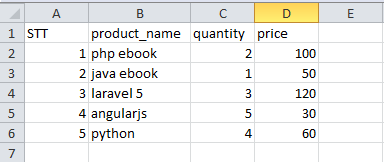
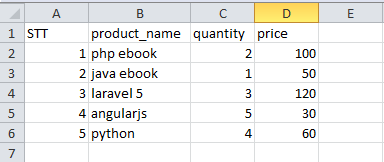
<p>Các bạn tải file&nbsp;<a href="https://topdev.vn/blog/wp-content/uploads/2019/08/product.xlsx">data mẫu</a>&nbsp;excel này mà mình đã tạo sẵn, có nội dung hình dưới và đặt nó nằm cùng cấp với thư mục&nbsp;<strong>Classes</strong>:</p>

<p><img alt="doc file excel voi php" data-sizes="(max-width: 384px) 100vw, 384px" data-src="https://topdev.vn/blog/wp-content/uploads/2019/08/doc-file-excel-voi-php.png" data-srcset="https://topdev.vn/blog/wp-content/uploads/2019/08/doc-file-excel-voi-php.png 384w, https://topdev.vn/blog/wp-content/uploads/2019/08/doc-file-excel-voi-php-300x127.png 300w" decoding="async" height="162" loading="lazy" sizes="(max-width: 384px) 100vw, 384px" src="http://thienhashop.com/uploads/news/2024_02/doc-file-excel-voi-php.png" srcset="https://topdev.vn/blog/wp-content/uploads/2019/08/doc-file-excel-voi-php.png 384w, https://topdev.vn/blog/wp-content/uploads/2019/08/doc-file-excel-voi-php-300x127.png 300w" width="384" /></p>

<p>Tiếp theo, bạn sẽ tiến hành đọc file này bằng cách tạo thêm 1 file mới tên là&nbsp;<strong>docfile.php</strong>&nbsp;cùng cấp với thư mục&nbsp;<strong>Classes</strong>, và gõ theo nội dung bên dưới:</p>

<pre>
&lt;?php
//  Include thư viện PHPExcel_IOFactory vào
include &#039;Classes/PHPExcel/IOFactory.php&#039;;

$inputFileName = &#039;product.xlsx&#039;;

//  Tiến hành đọc file excel
try {
    $inputFileType = PHPExcel_IOFactory::identify($inputFileName);
    $objReader = PHPExcel_IOFactory::createReader($inputFileType);
    $objPHPExcel = $objReader-&gt;load($inputFileName);
} catch(Exception $e) {
    die(&#039;Lỗi không thể đọc file &quot;&#039;.pathinfo($inputFileName,PATHINFO_BASENAME).&#039;&quot;: &#039;.$e-&gt;getMessage());
}

//  Lấy thông tin cơ bản của file excel

// Lấy sheet hiện tại
$sheet = $objPHPExcel-&gt;getSheet(0); 

// Lấy tổng số dòng của file, trong trường hợp này là 6 dòng
$highestRow = $sheet-&gt;getHighestRow(); 

// Lấy tổng số cột của file, trong trường hợp này là 4 dòng
$highestColumn = $sheet-&gt;getHighestColumn();

// Khai báo mảng $rowData chứa dữ liệu

//  Thực hiện việc lặp qua từng dòng của file, để lấy thông tin
for ($row = 1; $row &lt;= $highestRow; $row++){ 
    // Lấy dữ liệu từng dòng và đưa vào mảng $rowData
    $rowData&#91;&#93; = $sheet-&gt;rangeToArray(&#039;A&#039; . $row . &#039;:&#039; . $highestColumn . $row, NULL, TRUE,FALSE);
}

//In dữ liệu của mảng
echo &quot;&lt;pre&gt;&quot;;
print_r($rowData);
echo &quot;&lt;/pre&gt;&quot;;</pre>

<p>Tiếp theo bạn tiến hành thực thi file&nbsp;<strong>docfile.php</strong>&nbsp;này, sẽ thấy kết quả in ra màn hình là một mảng chứa tất cả thông tin của file excel product.xlsx.</p>

<pre>
Array
(
    &#91;0&#93; =&gt; Array
        (
            &#91;0&#93; =&gt; Array
                (
                    &#91;0&#93; =&gt; STT
                    &#91;1&#93; =&gt; product_name
                    &#91;2&#93; =&gt; quantity
                    &#91;3&#93; =&gt; price
                )

        )

    &#91;1&#93; =&gt; Array
        (
            &#91;0&#93; =&gt; Array
                (
                    &#91;0&#93; =&gt; 1
                    &#91;1&#93; =&gt; php ebook
                    &#91;2&#93; =&gt; 2
                    &#91;3&#93; =&gt; 100
                )

        )

    &#91;2&#93; =&gt; Array
        (
            &#91;0&#93; =&gt; Array
                (
                    &#91;0&#93; =&gt; 2
                    &#91;1&#93; =&gt; java ebook
                    &#91;2&#93; =&gt; 1
                    &#91;3&#93; =&gt; 50
                )

        )

    &#91;3&#93; =&gt; Array
        (
            &#91;0&#93; =&gt; Array
                (
                    &#91;0&#93; =&gt; 3
                    &#91;1&#93; =&gt; laravel 5
                    &#91;2&#93; =&gt; 3
                    &#91;3&#93; =&gt; 120
                )

        )

    &#91;4&#93; =&gt; Array
        (
            &#91;0&#93; =&gt; Array
                (
                    &#91;0&#93; =&gt; 4
                    &#91;1&#93; =&gt; angularjs
                    &#91;2&#93; =&gt; 5
                    &#91;3&#93; =&gt; 30
                )

        )

    &#91;5&#93; =&gt; Array
        (
            &#91;0&#93; =&gt; Array
                (
                    &#91;0&#93; =&gt; 5
                    &#91;1&#93; =&gt; python
                    &#91;2&#93; =&gt; 4
                    &#91;3&#93; =&gt; 60
                )

        )

)</pre>

<p>từ đó bạn có thể sử dụng mảng này cho mục đích thích hợp của bạn, như lưu vào cơ sở dữ liệu chẳng hạn.</p>
<a href="https://topdev.vn/blog/10-dieu-ban-can-biet-ve-php7/" rel="dofollow" target="_blank">&nbsp;&nbsp;10 điều bạn cần biết về PHP7</a>

<h3 id="ghi-du-lieu-ra-file-excel">Ghi dữ liệu ra file excel</h3>

<p>Tương tự như file excel, chúng ta sẽ tiếp tục dùng thư viện PHPExcel để ghi dữ liệu ra file.</p>

<p>Đầu tiên, các bạn tạo 1 file mới, đặt tên là&nbsp;<strong>ghifile.php</strong>&nbsp;và 1 file tên là product_import.xlsx (file này tạo ra và để trống, ko cần điền nội dung, vì chúng ta sẽ điền nội dung vào bằng thư viện PHPExcel) và đặt 2 file này cùng cấp với file&nbsp;<strong>docfile.php</strong>. Các bạn mở file&nbsp;<strong>docfile.php</strong>&nbsp;lên và gõ nội dung như sau :</p>

<pre>
&lt;?php
//  Include thư viện PHPExcel_IOFactory vào
include &#039;Classes/PHPExcel/IOFactory.php&#039;;

// Loại file cần ghi là file excel phiên bản 2007 trở đi
$fileType = &#039;Excel2007&#039;;
// Tên file cần ghi
$fileName = &#039;product_import.xlsx&#039;;

// Load file product_import.xlsx lên để tiến hành ghi file
$objPHPExcel = PHPExcel_IOFactory::load(&quot;product_import.xlsx&quot;);

// Giả sử chúng ta có mảng dữ liệu cần ghi như sau
$array_data = array(
					0 =&gt; array(&#039;name&#039; =&gt; &#039;Hieu&#039;, &#039;email&#039; =&gt; &#039;hieu@gmail.com&#039;, &#039;phone&#039; =&gt; &#039;0123456789&#039;, &#039;address&#039; =&gt; &#039;address 1&#039;),
					1 =&gt; array(&#039;name&#039; =&gt; &#039;Nam&#039;, &#039;email&#039; =&gt; &#039;nam@gmail.com&#039;, &#039;phone&#039; =&gt; &#039;0124567892&#039;, &#039;address&#039; =&gt; &#039;address 2&#039;),
					2 =&gt; array(&#039;name&#039; =&gt; &#039;Tuan&#039;, &#039;email&#039; =&gt; &#039;tuan@gmail.com&#039;, &#039;phone&#039; =&gt; &#039;09764346789&#039;, &#039;address&#039; =&gt; &#039;address 3&#039;),
					3 =&gt; array(&#039;name&#039; =&gt; &#039;Mai&#039;, &#039;email&#039; =&gt; &#039;mai@gmail.com&#039;, &#039;phone&#039; =&gt; &#039;09876543356&#039;, &#039;address&#039; =&gt; &#039;address 4&#039;),
					4 =&gt; array(&#039;name&#039; =&gt; &#039;Thao&#039;, &#039;email&#039; =&gt; &#039;thao@gmail.com&#039;, &#039;phone&#039; =&gt; &#039;0975458979&#039;, &#039;address&#039; =&gt; &#039;address 5&#039;),
				);

// Thiết lập tên các cột dữ liệu
$objPHPExcel-&gt;setActiveSheetIndex(0)
                            -&gt;setCellValue(&#039;A1&#039;, &quot;STT&quot;)
                            -&gt;setCellValue(&#039;B1&#039;, &quot;Name&quot;)
                            -&gt;setCellValue(&#039;C1&#039;, &quot;Email&quot;)
                            -&gt;setCellValue(&#039;D1&#039;, &quot;Phone&quot;)
                            -&gt;setCellValue(&#039;E1&#039;, &quot;Address&quot;);

// Lặp qua các dòng dữ liệu trong mảng $array_data và tiến hành ghi dữ liệu vào file excel
$i = 2;
foreach ($array_data as $value) {
	$objPHPExcel-&gt;setActiveSheetIndex(0)
								-&gt;setCellValue(&quot;A$i&quot;, &quot;$i&quot;)
								-&gt;setCellValue(&quot;B$i&quot;, $value&#91;&#039;name&#039;&#93;)
	                            -&gt;setCellValue(&quot;C$i&quot;, $value&#91;&#039;email&#039;&#93;)
	                            -&gt;setCellValue(&quot;D$i&quot;, $value&#91;&#039;phone&#039;&#93;)
	                            -&gt;setCellValue(&quot;E$i&quot;, $value&#91;&#039;address&#039;&#93;);
	$i++;
}
$objWriter = PHPExcel_IOFactory::createWriter($objPHPExcel, $fileType);
// Tiến hành ghi file
$objWriter-&gt;save($fileName);</pre>

<p>Cuối cùng chạy file&nbsp;<strong>ghifile.php</strong>&nbsp;và mở file&nbsp;<strong>product_import.xlsx</strong>&nbsp;lên, các bạn sẽ thấy dữ liệu đã được ghi vào bao gồm 5 dòng tương ứng số dòng dữ liệu trong array&nbsp;<strong>$array_data</strong>&nbsp;nhé.</p>

<h2 id="doc-va-ghi-file-excel-bang-laravel">Đọc và ghi file excel bằng Laravel</h2>

<h3 id="_import-du-lieu-tu-file-excel-1">Import dữ liệu từ file excel</h3>

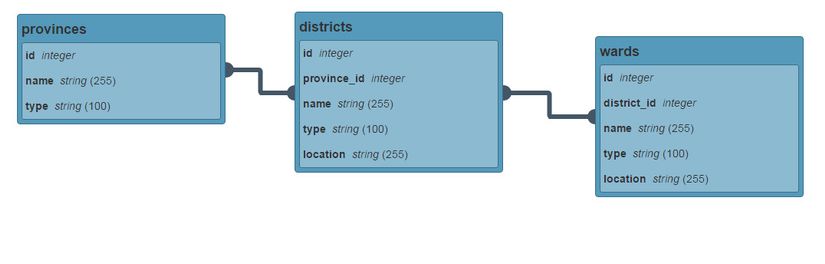
<p>Giả sử bài toán là 1 lượng lớn dữ liệu địa chỉ trong đó có phân cấp Tỉnh/Thành Phố, Quận/Huyện, Xã /Phường. Và ta đã biết 1 Tỉnh/Thành Phố có nhiều Quận/Huyện, 1 Quận/Huyện có nhiều Xã/Phường. Như vậy ta sẽ thiết kế DB với 3 bảng như sau: provinces, districts, wards.</p>

<p><img alt="phpexcel database" data-sizes="(max-width: 825px) 100vw, 825px" data-src="https://topdev.vn/blog/wp-content/uploads/2019/08/phpexcel-database.jpg" data-srcset="https://topdev.vn/blog/wp-content/uploads/2019/08/phpexcel-database.jpg 825w, https://topdev.vn/blog/wp-content/uploads/2019/08/phpexcel-database-300x96.jpg 300w, https://topdev.vn/blog/wp-content/uploads/2019/08/phpexcel-database-768x246.jpg 768w, https://topdev.vn/blog/wp-content/uploads/2019/08/phpexcel-database-696x223.jpg 696w" decoding="async" height="264" loading="lazy" sizes="(max-width: 825px) 100vw, 825px" src="http://thienhashop.com/uploads/news/2024_02/phpexcel-database.jpg" srcset="https://topdev.vn/blog/wp-content/uploads/2019/08/phpexcel-database.jpg 825w, https://topdev.vn/blog/wp-content/uploads/2019/08/phpexcel-database-300x96.jpg 300w, https://topdev.vn/blog/wp-content/uploads/2019/08/phpexcel-database-768x246.jpg 768w, https://topdev.vn/blog/wp-content/uploads/2019/08/phpexcel-database-696x223.jpg 696w" width="825" /></p>

<p>Trong bài demo này mình sẽ sử dụng Laravel và dùng Seed để import dữ liệu. Mình đã tạo project, migrate các bạn có thể xem trong source code. Dữ liệu dùng để demo là&nbsp;<a href="https://topdev.vn/blog/wp-content/uploads/2019/08/addresses.xls">Tổng hợp địa giới hành chính Việt Nam</a>.</p>

<p>Trước hết ta cài đặt thư viện vào project Laravel bằng dòng lệnh:</p>

<p><code>composer&nbsp;require&nbsp;phpoffice/phpexcel</code></p>

<p>Nhìn vào dữ liệu của file excel trên ta thấy có 3 sheet tỉnh, huyện, xã đã được khai báo khá rõ ràng nên ta có thể tưởng tượng ra được cách làm là đọc dữ liệu từng sheet một và insert vào các bảng tương ứng. Hiện thực hóa ý tưởng trên ta được kết quả:</p>

<pre>
&lt;?php

use IlluminateDatabaseSeeder;
use AppProvince;
use AppDistrict;
use AppWard;

class AddressSeeder extends Seeder
{
   /**
    * Run the database seeds.
    *
    * @return void
    */
   public function run()
   {
       $objPHPExcel = PHPExcel_IOFactory::load(base_path(&#039;addresses.xls&#039;)); // load file ra object PHPExcel
       $provinceSheet = $objPHPExcel-&gt;setActiveSheetIndex(0); // Set sheet sẽ được đọc dữ liệu
       $highestRow    = $provinceSheet-&gt;getHighestRow(); // Lấy số row lớn nhất trong sheet
       for ($row = 2; $row &lt;= $highestRow; $row++) { // For chạy từ 2 vì row 1 là title
           Province::create(&#91;
               &#039;id&#039; =&gt; $provinceSheet-&gt;getCellByColumnAndRow(0, $row)-&gt;getValue(), // lấy dữ liệu từng ô theo col và row
               &#039;name&#039; =&gt; $provinceSheet-&gt;getCellByColumnAndRow(1, $row)-&gt;getValue(),
               &#039;type&#039; =&gt; $provinceSheet-&gt;getCellByColumnAndRow(2, $row)-&gt;getValue(),
           &#93;);
       }
       $districtSheet = $objPHPExcel-&gt;setActiveSheetIndex(1);
       $highestRow    = $districtSheet-&gt;getHighestRow();
       for ($row = 2; $row &lt;= $highestRow; $row++) {
           District::create(&#91;
               &#039;id&#039; =&gt; $districtSheet-&gt;getCellByColumnAndRow(0, $row)-&gt;getValue(),
               &#039;name&#039; =&gt; $districtSheet-&gt;getCellByColumnAndRow(1, $row)-&gt;getValue(),
               &#039;type&#039; =&gt; $districtSheet-&gt;getCellByColumnAndRow(2, $row)-&gt;getValue(),
               &#039;location&#039; =&gt; $districtSheet-&gt;getCellByColumnAndRow(3, $row)-&gt;getValue(),
               &#039;province_id&#039; =&gt; $districtSheet-&gt;getCellByColumnAndRow(4, $row)-&gt;getValue(),
           &#93;);
       }
       $wardSheet = $objPHPExcel-&gt;setActiveSheetIndex(2);
       $highestRow    = $wardSheet-&gt;getHighestRow();
       for ($row = 2; $row &lt;= $highestRow; $row++) {
           Ward::create(&#91;
               &#039;id&#039; =&gt; $wardSheet-&gt;getCellByColumnAndRow(0, $row)-&gt;getValue(),
               &#039;name&#039; =&gt; $wardSheet-&gt;getCellByColumnAndRow(1, $row)-&gt;getValue(),
               &#039;type&#039; =&gt; $wardSheet-&gt;getCellByColumnAndRow(2, $row)-&gt;getValue(),
               &#039;location&#039; =&gt; $wardSheet-&gt;getCellByColumnAndRow(3, $row)-&gt;getValue(),
               &#039;district_id&#039; =&gt; $wardSheet-&gt;getCellByColumnAndRow(4, $row)-&gt;getValue(),
           &#93;);
       }
   }
}</pre>

<p>Ở đây mới chỉ sử dụng các hàm đơn giản của PHPExcel để đọc dữ liệu ra, mình có comment code rất dễ hiểu. Ngoài các hàm đơn giản trên thì PHPExcel hỗ trợ rất nhiều hàm liên quan đến việc đọc dữ liệu các bạn có thể xem document ở&nbsp;<a href="https://github.com/PHPOffice/PHPExcel/blob/develop/Documentation/markdown/Overview/07-Accessing-Cells.md" rel="noopener noreferrer" target="_blank">đây</a>.</p>

<h3 id="_export-du-lieu-tu-db-ra-file-excel-2">Export dữ liệu từ DB ra file excel</h3>

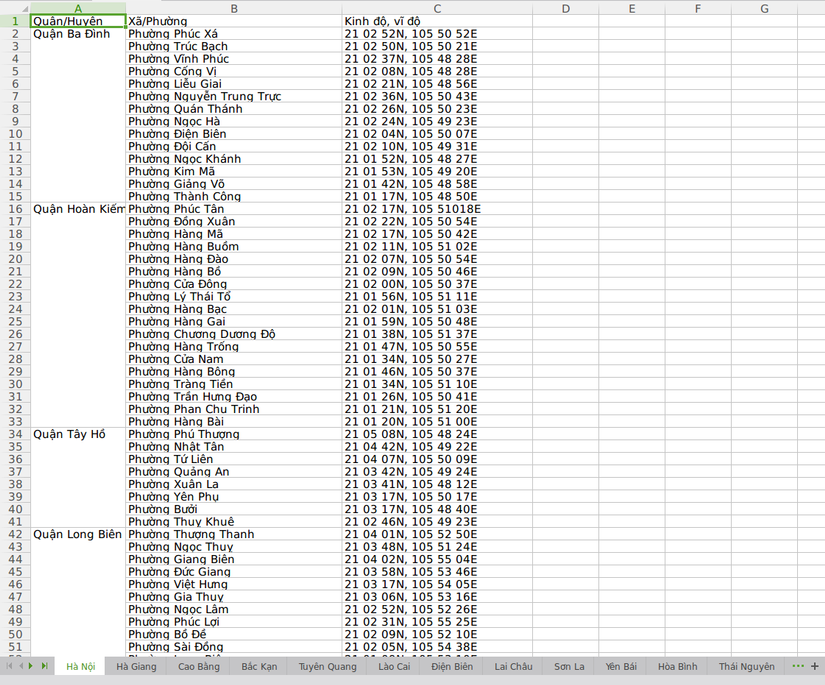
<p>Ở trên đã import dữ liệu từ file excel vào DB, bây giờ sẽ làm điều ngược lại. Để tăng độ khó bài toán ta sẽ không export ra file giống như cũ mà giả sử khách hàng yêu cầu mình export dữ liệu ra file excel có format như sau:</p>

<ul>
	<li>Tạo các sheet tương ứng với tên các tỉnh/thành phố.</li>
	<li>Tương ứng với mỗi sheet ghi rõ tên quận/huyện và các xã/phường thuộc quận/huyện đó.</li>
</ul>

<p>Tạo 1 artisan command để làm việc này. Nội dung như sau:</p>

<pre>
&lt;?php

namespace AppConsoleCommands;

use AppProvince;
use IlluminateConsoleCommand;

class ExportExcel extends Command
{
    /**
     * The name and signature of the console command.
     *
     * @var string
     */
    protected $signature = &#039;db:export_to_excel&#039;;

    /**
     * The console command description.
     *
     * @var string
     */
    protected $description = &#039;Export address to excel&#039;;

    /**
     * Create a new command instance.
     *
     * @return void
     */
    public function __construct()
    {
        parent::__construct();
    }

    /**
     * Execute the console command.
     *
     * @return mixed
     */
    public function handle()
    {
        $provinces = Province::with(&#039;districts&#039;)-&gt;get();
        $objPHPExcel = new PHPExcel();
        foreach ($provinces as $key =&gt; $province) {
            $objPHPExcel-&gt;createSheet(); // tạo 1 sheet mới
            $activeSheet = $objPHPExcel-&gt;setActiveSheetIndex($key);
            $activeSheet-&gt;setTitle($province-&gt;name); // đặt tên sheet là tên tỉnh
            $activeSheet-&gt;setCellValue(&#039;A1&#039;, &#039;Quận/Huyện&#039;)
                -&gt;setCellValue(&#039;B1&#039;, &#039;Xã/Phường&#039;)
                -&gt;setCellValue(&#039;C1&#039;, &#039;Kinh độ, vĩ độ&#039;); // set title cho dòng đầu tiên
            $i = 2;
            $j = 2;
            foreach ($province-&gt;districts as $district) {
                $activeSheet-&gt;setCellValue(&quot;A$i&quot;, $district-&gt;type . &#039; &#039; . $district-&gt;name); // set tên quận/huyện
                foreach ($district-&gt;wards as $ward) {
                    $activeSheet-&gt;setCellValue(&quot;B$j&quot;, $ward-&gt;type . &#039; &#039; . $ward-&gt;name); // tương ứng mỗi quận huyện set tên xã/phường
                    $activeSheet-&gt;setCellValue(&quot;C$j&quot;, $ward-&gt;location);
                    $j++;
                }
                $rowMerge = $j - 1;
                if ($i &lt; $rowMerge) {
                    $activeSheet-&gt;mergeCells(&quot;A$i:A$rowMerge&quot;); // merge các cell có cùng 1 quận/huyện
                }
                $i = $j;
            }
            foreach (range(&#039;A&#039;, &#039;C&#039;) as $columnId) {
                $activeSheet-&gt;getColumnDimension($columnId)-&gt;setAutoSize(true);
            }
        }
        $objWriter = PHPExcel_IOFactory::createWriter($objPHPExcel, &#039;Excel2007&#039;);
        $objWriter-&gt;save(base_path(&#039;result.xlsx&#039;));
    }
}</pre>

<p>Kết quả nhận được là:</p>

<p><img alt="export phpexcel" data-sizes="(max-width: 825px) 100vw, 825px" data-src="https://topdev.vn/blog/wp-content/uploads/2019/08/export-phpexcel.png" data-srcset="https://topdev.vn/blog/wp-content/uploads/2019/08/export-phpexcel.png 825w, https://topdev.vn/blog/wp-content/uploads/2019/08/export-phpexcel-300x249.png 300w, https://topdev.vn/blog/wp-content/uploads/2019/08/export-phpexcel-768x638.png 768w, https://topdev.vn/blog/wp-content/uploads/2019/08/export-phpexcel-696x578.png 696w, https://topdev.vn/blog/wp-content/uploads/2019/08/export-phpexcel-506x420.png 506w" decoding="async" height="685" loading="lazy" sizes="(max-width: 825px) 100vw, 825px" src="http://thienhashop.com/uploads/news/2024_02/export-phpexcel.png" srcset="https://topdev.vn/blog/wp-content/uploads/2019/08/export-phpexcel.png 825w, https://topdev.vn/blog/wp-content/uploads/2019/08/export-phpexcel-300x249.png 300w, https://topdev.vn/blog/wp-content/uploads/2019/08/export-phpexcel-768x638.png 768w, https://topdev.vn/blog/wp-content/uploads/2019/08/export-phpexcel-696x578.png 696w, https://topdev.vn/blog/wp-content/uploads/2019/08/export-phpexcel-506x420.png 506w" width="825" /></p>
		</div>
	</div>
	<div id="footer" class="clearfix">
		<div id="url">
			<strong>URL của bản tin này: </strong><a href="http://thienhashop.com/news/huong-dan-phan-mem/phpexcel-import-va-export-xu-ly-excel-211.html" title="PHPExcel – Import và Export xử lý Excel">http://thienhashop.com/news/huong-dan-phan-mem/phpexcel-import-va-export-xu-ly-excel-211.html</a>

		</div>
		<div class="clear"></div>
		<div class="copyright">
			&copy; PHAN MEM THIEN HA
		</div>
		<div id="contact">
			<a href="mailto:phamhuy842005@gmail.com">phamhuy842005@gmail.com</a>
		</div>
	</div>
</div>
        <div id="timeoutsess" class="chromeframe">
            Bạn đã không sử dụng Site, <a onclick="timeoutsesscancel();" href="http://thienhashop.com/#">Bấm vào đây để duy trì trạng thái đăng nhập</a>. Thời gian chờ: <span id="secField"> 60 </span> giây
        </div>
        <div id="openidResult" class="nv-alert" style="display:none"></div>
        <div id="openidBt" data-result="" data-redirect=""></div>
<script src="http://thienhashop.com/assets/js/jquery/jquery.min.js"></script>
<script>var nv_base_siteurl="/",nv_lang_data="vi",nv_lang_interface="vi",nv_name_variable="nv",nv_fc_variable="op",nv_lang_variable="language",nv_module_name="news",nv_func_name="savefile",nv_is_user=0, nv_my_ofs=7,nv_my_abbr="ICT",nv_cookie_prefix="nv4c_y8Y7D",nv_check_pass_mstime=1738000,nv_area_admin=0,nv_safemode=0,theme_responsive=1,nv_is_recaptcha=1,nv_recaptcha_sitekey="6LeSarIUAAAAAHRq6xkHwO6J0YYQOdMxgqKTXoL_",nv_recaptcha_type="image",nv_recaptcha_elements=[];</script>
<script src="http://thienhashop.com/assets/js/language/vi.js"></script>
<script src="http://thienhashop.com/assets/js/global.js"></script>
<script src="http://thienhashop.com/themes/default/js/news.js"></script>
<script src="http://thienhashop.com/themes/popovleather/js/main.js"></script>
<script src="http://thienhashop.com/themes/popovleather/js/bootstrap.min.js"></script>
</body>
</html>