<!DOCTYPE html>
	<html lang="vi" xmlns="http://www.w3.org/1999/xhtml" prefix="og: http://ogp.me/ns#">
	<head>
<title>Xây dựng Domain Controller trên nền Window server 2012</title>
<meta name="description" content="Xây dựng Domain Controller trên nền Window server 2012 - Savefile - Tin Tức -...">
<meta name="author" content="PHAN MEM THIEN HA">
<meta name="copyright" content="PHAN MEM THIEN HA [phamhuy842005@gmail.com]">
<meta name="robots" content="index, archive, follow, noodp">
<meta name="googlebot" content="index,archive,follow,noodp">
<meta name="msnbot" content="all,index,follow">
<meta name="generator" content="NukeViet v4.0">
<meta name="viewport" content="width=device-width, initial-scale=1">
<meta http-equiv="Content-Type" content="text/html; charset=utf-8">
<meta property="og:title" content="Xây dựng Domain Controller trên nền Window server 2012">
<meta property="og:type" content="website">
<meta property="og:description" content="Savefile - Tin Tức - http&#x3A;&#x002F;&#x002F;thienhashop.com&#x002F;news&#x002F;savefile&#x002F;huong-dan-phan-mem&#x002F;xay-dung-domain-controller-tren-nen-window-server-2012-172.html">
<meta property="og:site_name" content="PHAN MEM THIEN HA">
<meta property="og:url" content="http://phanmemthienha.com/news/huong-dan-phan-mem/xay-dung-domain-controller-tren-nen-window-server-2012-172.html">
<link rel="shortcut icon" href="http://thienhashop.com/uploads/logo-shop-thien-ha-5.png">
<link rel="canonical" href="http://phanmemthienha.com/news/huong-dan-phan-mem/xay-dung-domain-controller-tren-nen-window-server-2012-172.html">
<link rel="alternate" href="http://thienhashop.com/news/rss/" title="Tin Tức" type="application/rss+xml">
<link rel="alternate" href="http://thienhashop.com/news/rss/huong-dan-phan-mem/" title="Tin Tức - Hướng dẫn phần mềm" type="application/rss+xml">
<link rel="alternate" href="http://thienhashop.com/news/rss/huong-dan-noi-bo/" title="Tin Tức - Hướng dẫn nội bộ" type="application/rss+xml">
<link rel="alternate" href="http://thienhashop.com/news/rss/Doi-tac/" title="Tin Tức - Đối tác" type="application/rss+xml">
<link rel="alternate" href="http://thienhashop.com/news/rss/Tuyen-dung/" title="Tin Tức - Tuyển dụng" type="application/rss+xml">
<link rel="preload" as="script" href="http://thienhashop.com/assets/js/jquery/jquery.min.js">
<link rel="preload" as="script" href="http://thienhashop.com/assets/js/language/vi.js">
<link rel="preload" as="script" href="http://thienhashop.com/assets/js/global.js">
<link rel="preload" as="script" href="http://thienhashop.com/themes/default/js/news.js">
<link rel="preload" as="script" href="http://thienhashop.com/themes/popovleather/js/main.js">
<link rel="preload" as="script" href="http://thienhashop.com/themes/popovleather/js/bootstrap.min.js">
<link rel="StyleSheet" href="http://thienhashop.com/assets/css/font-awesome.min.css">
<link rel="StyleSheet" href="http://thienhashop.com/themes/popovleather/css/bootstrap.min.css">
<link rel="StyleSheet" href="http://thienhashop.com/themes/popovleather/css/style.css">
<link rel="StyleSheet" href="http://thienhashop.com/themes/popovleather/css/style.responsive.css">
<link rel="StyleSheet" href="http://thienhashop.com/themes/default/css/news.css">
<link rel="StyleSheet" href="http://thienhashop.com/assets/css/popovleather.vi.0.css?t=87">
<style>
	body{background: #fff;}
</style>
	</head>
	<body>
<div id="print">
	<div id="hd_print">
		<h2 class="pull-left">PHAN MEM THIEN HA</h2>
		<p class="pull-right"><a title="PHAN MEM THIEN HA" href="http://thienhashop.com/">http://thienhashop.com</a></p>
	</div>
	<div class="clear"></div>
	<hr />
	<div id="content">
		<h1>Xây dựng Domain Controller trên nền Window server 2012</h1>
		<ul class="list-inline">
			<li>Thứ ba - 18/08/2020 09:04</li>
			<li class="hidden-print txtrequired"><em class="fa fa-print">&nbsp;</em><a title="In ra" href="javascript:;" onclick="window.print()">In ra</a></li>
			<li class="hidden-print txtrequired"><em class="fa fa-power-off">&nbsp;</em><a title="Đóng cửa sổ này" href="javascript:;" onclick="window.close()">Đóng cửa sổ này</a></li>
		</ul>
		<div class="clear"></div>
		<div id="hometext">
			Xây dựng Domain Controller trên nền Window server 2012
		</div>
				<div class="imghome">
			<img alt="Xây dựng Domain Controller trên nền Window server 2012" src="http://sinhvientot.net/wp-content/uploads/2017/03/MoHinhAD_.jpg" width="460" class="img-thumbnail" />
		</div>
		<div class="clear"></div>
		<div id="bodytext" class="clearfix">
			<p>Xin chào các bạn, hôm nay mình sẽ hướng dẫn các bạn triển khai hệ thống mạng domain cho công ty.</p>

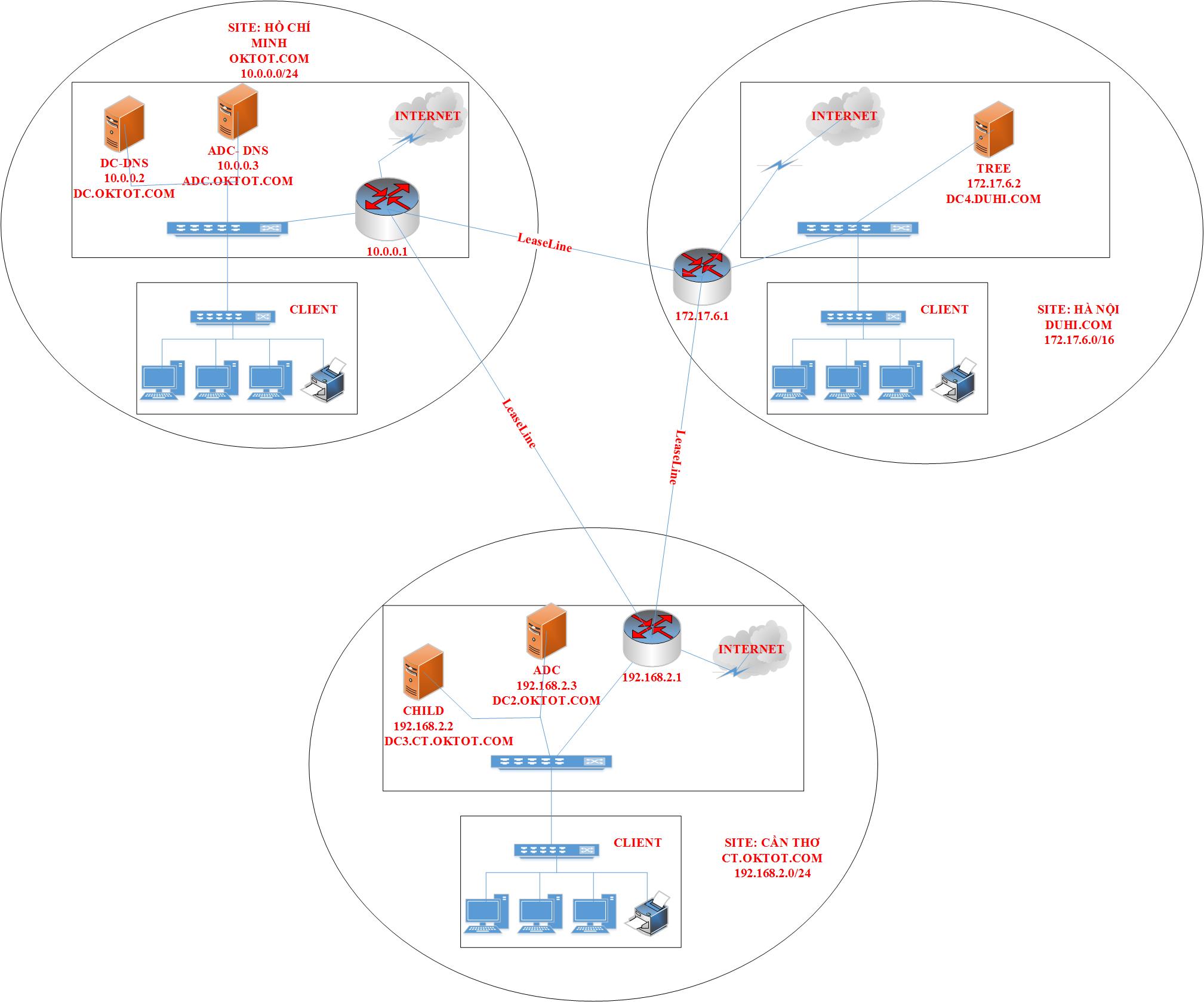
<p>Bối cảnh: Công ty Oktot có 3 Site (trụ sở) tại Hồ Chí Minh, Cần Thơ và Hà Nội:</p>

<p><img alt="" height="1678" loading="lazy" sizes="(max-width: 2017px) 100vw, 2017px" src="http://sinhvientot.net/wp-content/uploads/2017/03/MoHinhAD_.jpg" srcset="https://sinhvientot.net/wp-content/uploads/2017/03/MoHinhAD_.jpg 2017w, https://sinhvientot.net/wp-content/uploads/2017/03/MoHinhAD_-300x250.jpg 300w, https://sinhvientot.net/wp-content/uploads/2017/03/MoHinhAD_-768x639.jpg 768w, https://sinhvientot.net/wp-content/uploads/2017/03/MoHinhAD_-1024x852.jpg 1024w, https://sinhvientot.net/wp-content/uploads/2017/03/MoHinhAD_-696x579.jpg 696w, https://sinhvientot.net/wp-content/uploads/2017/03/MoHinhAD_-1068x888.jpg 1068w, https://sinhvientot.net/wp-content/uploads/2017/03/MoHinhAD_-505x420.jpg 505w" width="2017" /></p>

<p>-Trụ sở chính tại TP Hồ Chí Minh với Domain Oktot.com,</p>
<iframe allowfullscreen="true" allowtransparency="true" data-google-container-id="a!6" data-google-query-id="CPGf353Uo-sCFQ5KYAod_50J8A" data-load-complete="true" frameborder="0" height="280" hspace="0" id="aswift_6" marginheight="0" marginwidth="0" name="aswift_6" sandbox="allow-forms allow-pointer-lock allow-popups allow-popups-to-escape-sandbox allow-same-origin allow-scripts allow-top-navigation-by-user-activation" scrolling="no" src="https://googleads.g.doubleclick.net/pagead/ads?client=ca-pub-6604842658947639&amp;output=html&amp;h=280&amp;adk=449541660&amp;adf=4137264603&amp;w=696&amp;fwrn=4&amp;fwrnh=100&amp;lmt=1597716023&amp;num_ads=1&amp;rafmt=1&amp;armr=3&amp;sem=mc&amp;pwprc=6824441388&amp;psa=0&amp;guci=2.2.0.0.2.2.0.0&amp;ad_type=text_image&amp;format=696x280&amp;url=https%3A%2F%2Fsinhvientot.net%2Fxay-dung-domain-controller-tren-nen-window-server-2012%2F&amp;flash=0&amp;fwr=0&amp;pra=3&amp;rh=174&amp;rw=696&amp;rpe=1&amp;resp_fmts=3&amp;wgl=1&amp;fa=27&amp;adsid=ChAI8NXo-QUQjpSW37fhsp1aEkgA-FBWzleCeMDPZn25VBxA2JMb7R23Pz0uFFrjh72Fxwz6StBrZfRlfLI8vVwQBxoKvK6TEe7g0noLG5pd2vc6D1rWxBJSmqM&amp;dt=1597715981652&amp;bpp=2&amp;bdt=2097&amp;idt=3&amp;shv=r20200810&amp;cbv=r20190131&amp;ptt=9&amp;saldr=aa&amp;abxe=1&amp;cookie=ID%3Dda2c39f73dc71ccf-2202ee3307c3007f%3AT%3D1597716043%3ART%3D1597716043%3AS%3DALNI_MZ8qqxXpK1yPpsmdjUZM-simHjfAA&amp;prev_fmts=0x0%2C728x90%2C300x250&amp;nras=2&amp;correlator=3076977119044&amp;frm=20&amp;pv=1&amp;ga_vid=725298327.1597715982&amp;ga_sid=1597715982&amp;ga_hid=1530612955&amp;ga_fc=0&amp;iag=0&amp;icsg=572841970543615&amp;dssz=49&amp;mdo=0&amp;mso=0&amp;u_tz=420&amp;u_his=1&amp;u_java=0&amp;u_h=1080&amp;u_w=1920&amp;u_ah=1040&amp;u_aw=1920&amp;u_cd=24&amp;u_nplug=3&amp;u_nmime=4&amp;adx=418&amp;ady=1255&amp;biw=1903&amp;bih=969&amp;scr_x=0&amp;scr_y=0&amp;eid=42530558%2C42530560%2C42530587%2C21066392&amp;oid=3&amp;psts=AGkb-H_5ZZJLzLkGt1IVDE9gxhHyq38HPm1qNj_zoMFFUAhkpO-JszlXutAFBNqfnJkH%2CAGkb-H-gFD_NwkW8lQ7dX0KgZi3FZIIqtOS_PfpGYiSytQPmFc_kklyNH70ltDhF1zvzNw&amp;pvsid=3001394709318963&amp;pem=941&amp;ref=https%3A%2F%2Fwww.google.com.vn%2F&amp;rx=0&amp;eae=0&amp;fc=1408&amp;brdim=0%2C0%2C0%2C0%2C1920%2C0%2C0%2C0%2C1920%2C969&amp;vis=1&amp;rsz=%7C%7Cs%7C&amp;abl=NS&amp;fu=8320&amp;bc=31&amp;jar=2020-08-17-09&amp;ifi=6&amp;uci=a!6&amp;btvi=1&amp;fsb=1&amp;xpc=n4pFCqywZU&amp;p=https%3A//sinhvientot.net&amp;dtd=41438" vspace="0" width="696"></iframe>

<p>Để dự phòng công ty triển khai thêm 1 Additional Domain controller.</p>

<p>-Chi nhánh Cần Thơ triển khai 1 Child domain là ct.sinhvientot.net</p>

<p>-Công ty có một Domain tree đặt ngoài Hà Nội: duhi.com</p>

<p>Đầu tiên ta xây dựng Domain controller trên site HCM</p>

<p>Ta tiến hành từng bước như sau:</p>

<p>Bước 1. Đặt IP tĩnh cho máy chọn làm Domain Controller</p>

<p>Bước 2. Dựng Domain Controller trên máy Server đã chọn làm Domain Controller</p>

<p>Bước 3. Tạo tài khoản cho các máy Client</p>

<p>Bước 4. Đặt IP và Join các Client vào Domain</p>

<p>Bước 5. Đăng nhập máy Client để kiểm tra</p>

<p><strong>Chi tiết quá trình xây dựng Domain Controller</strong></p>

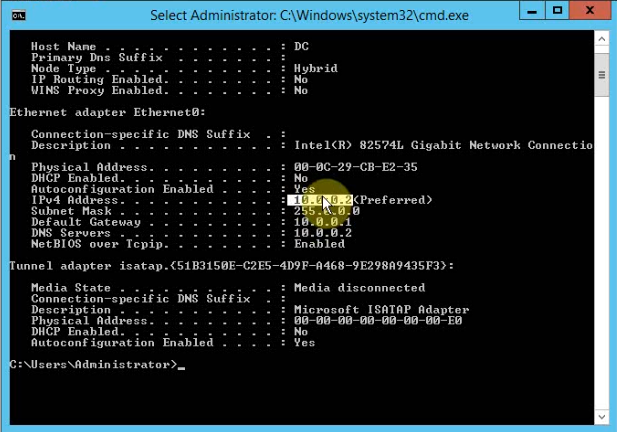
<p>Đặt IP tĩnh cho máy được chọn làm DC</p>

<p><img alt="" height="432" loading="lazy" sizes="(max-width: 617px) 100vw, 617px" src="http://sinhvientot.net/wp-content/uploads/2017/04/1.png" srcset="https://sinhvientot.net/wp-content/uploads/2017/04/1.png 617w, https://sinhvientot.net/wp-content/uploads/2017/04/1-300x210.png 300w, https://sinhvientot.net/wp-content/uploads/2017/04/1-100x70.png 100w, https://sinhvientot.net/wp-content/uploads/2017/04/1-600x420.png 600w" width="617" /></p>

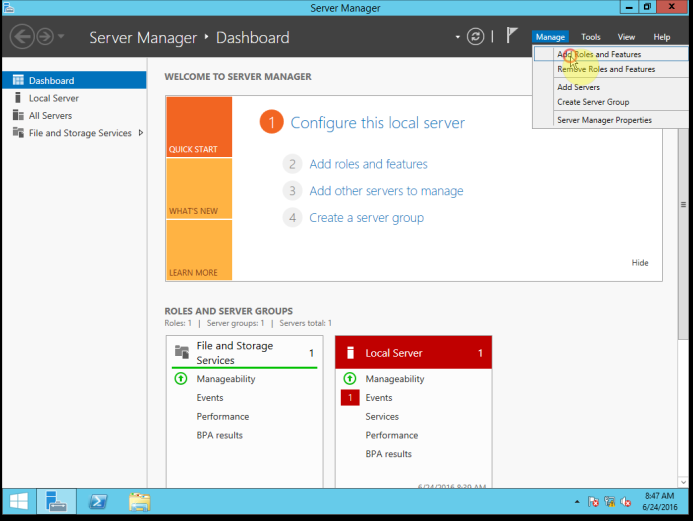
<p>Mở Server Manager lên, sau đó chọn Add Roles and Features.</p>

<p><img alt="" height="521" loading="lazy" sizes="(max-width: 693px) 100vw, 693px" src="http://sinhvientot.net/wp-content/uploads/2017/04/2.png" srcset="https://sinhvientot.net/wp-content/uploads/2017/04/2.png 693w, https://sinhvientot.net/wp-content/uploads/2017/04/2-300x226.png 300w, https://sinhvientot.net/wp-content/uploads/2017/04/2-80x60.png 80w, https://sinhvientot.net/wp-content/uploads/2017/04/2-265x198.png 265w, https://sinhvientot.net/wp-content/uploads/2017/04/2-559x420.png 559w" width="693" /></p>

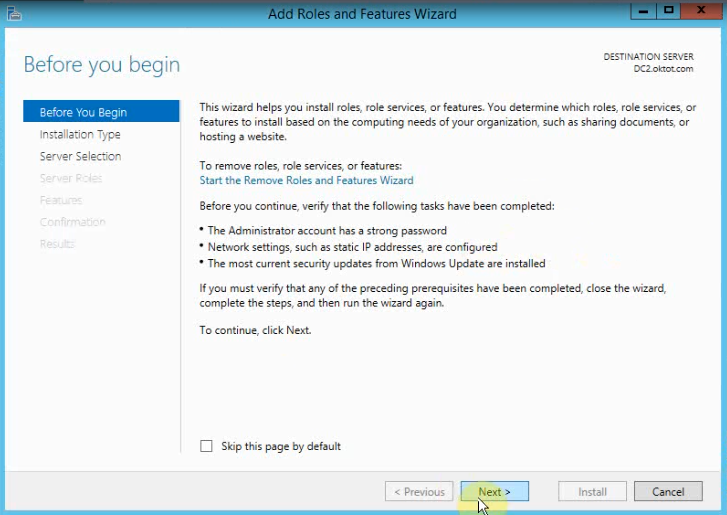
<p>Màn hình giới thiệu chọn Next để qua bước tiếp theo</p>
<iframe allowfullscreen="true" allowtransparency="true" data-google-container-id="a!7" data-google-query-id="CNLT353Uo-sCFW_BTAId_68Gyw" data-load-complete="true" frameborder="0" height="280" hspace="0" id="aswift_7" marginheight="0" marginwidth="0" name="aswift_7" sandbox="allow-forms allow-pointer-lock allow-popups allow-popups-to-escape-sandbox allow-same-origin allow-scripts allow-top-navigation-by-user-activation" scrolling="no" src="https://googleads.g.doubleclick.net/pagead/ads?client=ca-pub-6604842658947639&amp;output=html&amp;h=280&amp;adk=449541660&amp;adf=509006369&amp;w=696&amp;fwrn=4&amp;fwrnh=100&amp;lmt=1597716023&amp;num_ads=1&amp;rafmt=1&amp;armr=3&amp;sem=mc&amp;pwprc=6824441388&amp;psa=0&amp;guci=2.2.0.0.2.2.0.0&amp;ad_type=text_image&amp;format=696x280&amp;url=https%3A%2F%2Fsinhvientot.net%2Fxay-dung-domain-controller-tren-nen-window-server-2012%2F&amp;flash=0&amp;fwr=0&amp;pra=3&amp;rh=174&amp;rw=696&amp;rpe=1&amp;resp_fmts=3&amp;wgl=1&amp;fa=27&amp;adsid=ChAI8NXo-QUQjpSW37fhsp1aEkgA-FBWzleCeMDPZn25VBxA2JMb7R23Pz0uFFrjh72Fxwz6StBrZfRlfLI8vVwQBxoKvK6TEe7g0noLG5pd2vc6D1rWxBJSmqM&amp;dt=1597715981658&amp;bpp=1&amp;bdt=2103&amp;idt=1&amp;shv=r20200810&amp;cbv=r20190131&amp;ptt=9&amp;saldr=aa&amp;abxe=1&amp;cookie=ID%3Dda2c39f73dc71ccf-2202ee3307c3007f%3AT%3D1597716043%3ART%3D1597716043%3AS%3DALNI_MZ8qqxXpK1yPpsmdjUZM-simHjfAA&amp;prev_fmts=0x0%2C728x90%2C300x250%2C696x280&amp;nras=3&amp;correlator=3076977119044&amp;frm=20&amp;pv=1&amp;ga_vid=725298327.1597715982&amp;ga_sid=1597715982&amp;ga_hid=1530612955&amp;ga_fc=0&amp;iag=0&amp;icsg=2824641784228863&amp;dssz=50&amp;mdo=0&amp;mso=0&amp;u_tz=420&amp;u_his=1&amp;u_java=0&amp;u_h=1080&amp;u_w=1920&amp;u_ah=1040&amp;u_aw=1920&amp;u_cd=24&amp;u_nplug=3&amp;u_nmime=4&amp;adx=418&amp;ady=3268&amp;biw=1903&amp;bih=969&amp;scr_x=0&amp;scr_y=0&amp;eid=42530558%2C42530560%2C42530587%2C21066392&amp;oid=3&amp;psts=AGkb-H_5ZZJLzLkGt1IVDE9gxhHyq38HPm1qNj_zoMFFUAhkpO-JszlXutAFBNqfnJkH%2CAGkb-H-gFD_NwkW8lQ7dX0KgZi3FZIIqtOS_PfpGYiSytQPmFc_kklyNH70ltDhF1zvzNw&amp;pvsid=3001394709318963&amp;pem=941&amp;ref=https%3A%2F%2Fwww.google.com.vn%2F&amp;rx=0&amp;eae=0&amp;fc=1408&amp;brdim=0%2C0%2C0%2C0%2C1920%2C0%2C0%2C0%2C1920%2C969&amp;vis=1&amp;rsz=%7C%7Cs%7C&amp;abl=NS&amp;fu=8320&amp;bc=31&amp;jar=2020-08-17-09&amp;ifi=7&amp;uci=a!7&amp;btvi=2&amp;fsb=1&amp;xpc=bD2RYzv4Aj&amp;p=https%3A//sinhvientot.net&amp;dtd=41444" vspace="0" width="696"></iframe>

<p><img alt="" height="515" loading="lazy" sizes="(max-width: 727px) 100vw, 727px" src="http://sinhvientot.net/wp-content/uploads/2017/04/3.png" srcset="https://sinhvientot.net/wp-content/uploads/2017/04/3.png 727w, https://sinhvientot.net/wp-content/uploads/2017/04/3-300x213.png 300w, https://sinhvientot.net/wp-content/uploads/2017/04/3-100x70.png 100w, https://sinhvientot.net/wp-content/uploads/2017/04/3-696x493.png 696w, https://sinhvientot.net/wp-content/uploads/2017/04/3-593x420.png 593w" width="727" /></p>

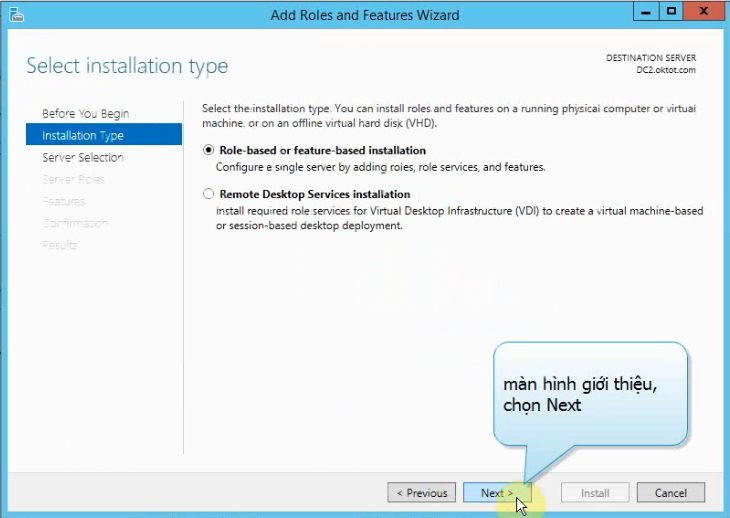
<p>Màn hình Select installation type. Chọn Role based or…..Click Next<img alt="" height="518" loading="lazy" sizes="(max-width: 730px) 100vw, 730px" src="http://sinhvientot.net/wp-content/uploads/2017/04/4.png" srcset="https://sinhvientot.net/wp-content/uploads/2017/04/4.png 730w, https://sinhvientot.net/wp-content/uploads/2017/04/4-300x213.png 300w, https://sinhvientot.net/wp-content/uploads/2017/04/4-100x70.png 100w, https://sinhvientot.net/wp-content/uploads/2017/04/4-696x494.png 696w, https://sinhvientot.net/wp-content/uploads/2017/04/4-592x420.png 592w" width="730" /></p>
<iframe allowfullscreen="true" allowtransparency="true" data-google-container-id="a!8" data-google-query-id="CIPF353Uo-sCFUpmiwodqIoLNg" data-load-complete="true" frameborder="0" height="280" hspace="0" id="aswift_8" marginheight="0" marginwidth="0" name="aswift_8" sandbox="allow-forms allow-pointer-lock allow-popups allow-popups-to-escape-sandbox allow-same-origin allow-scripts allow-top-navigation-by-user-activation" scrolling="no" src="https://googleads.g.doubleclick.net/pagead/ads?client=ca-pub-6604842658947639&amp;output=html&amp;h=280&amp;adk=449541660&amp;adf=614681537&amp;w=696&amp;fwrn=4&amp;fwrnh=100&amp;lmt=1597716023&amp;num_ads=1&amp;rafmt=1&amp;armr=3&amp;sem=mc&amp;pwprc=6824441388&amp;psa=0&amp;guci=2.2.0.0.2.2.0.0&amp;ad_type=text_image&amp;format=696x280&amp;url=https%3A%2F%2Fsinhvientot.net%2Fxay-dung-domain-controller-tren-nen-window-server-2012%2F&amp;flash=0&amp;fwr=0&amp;pra=3&amp;rh=174&amp;rw=696&amp;rpe=1&amp;resp_fmts=3&amp;wgl=1&amp;fa=27&amp;adsid=ChAI8NXo-QUQjpSW37fhsp1aEkgA-FBWzleCeMDPZn25VBxA2JMb7R23Pz0uFFrjh72Fxwz6StBrZfRlfLI8vVwQBxoKvK6TEe7g0noLG5pd2vc6D1rWxBJSmqM&amp;dt=1597715981661&amp;bpp=1&amp;bdt=2106&amp;idt=1&amp;shv=r20200810&amp;cbv=r20190131&amp;ptt=9&amp;saldr=aa&amp;abxe=1&amp;cookie=ID%3Dda2c39f73dc71ccf-2202ee3307c3007f%3AT%3D1597716043%3ART%3D1597716043%3AS%3DALNI_MZ8qqxXpK1yPpsmdjUZM-simHjfAA&amp;prev_fmts=0x0%2C728x90%2C300x250%2C696x280%2C696x280&amp;nras=4&amp;correlator=3076977119044&amp;frm=20&amp;pv=1&amp;ga_vid=725298327.1597715982&amp;ga_sid=1597715982&amp;ga_hid=1530612955&amp;ga_fc=0&amp;iag=0&amp;icsg=2824641784228863&amp;dssz=50&amp;mdo=0&amp;mso=0&amp;u_tz=420&amp;u_his=1&amp;u_java=0&amp;u_h=1080&amp;u_w=1920&amp;u_ah=1040&amp;u_aw=1920&amp;u_cd=24&amp;u_nplug=3&amp;u_nmime=4&amp;adx=418&amp;ady=4625&amp;biw=1903&amp;bih=969&amp;scr_x=0&amp;scr_y=0&amp;eid=42530558%2C42530560%2C42530587%2C21066392&amp;oid=3&amp;psts=AGkb-H_5ZZJLzLkGt1IVDE9gxhHyq38HPm1qNj_zoMFFUAhkpO-JszlXutAFBNqfnJkH%2CAGkb-H-gFD_NwkW8lQ7dX0KgZi3FZIIqtOS_PfpGYiSytQPmFc_kklyNH70ltDhF1zvzNw&amp;pvsid=3001394709318963&amp;pem=941&amp;ref=https%3A%2F%2Fwww.google.com.vn%2F&amp;rx=0&amp;eae=0&amp;fc=1408&amp;brdim=0%2C0%2C0%2C0%2C1920%2C0%2C0%2C0%2C1920%2C969&amp;vis=1&amp;rsz=%7C%7Cs%7C&amp;abl=NS&amp;fu=8320&amp;bc=31&amp;jar=2020-08-17-09&amp;ifi=8&amp;uci=a!8&amp;btvi=3&amp;fsb=1&amp;xpc=0FCa13Xi3Z&amp;p=https%3A//sinhvientot.net&amp;dtd=41444" vspace="0" width="696"></iframe>

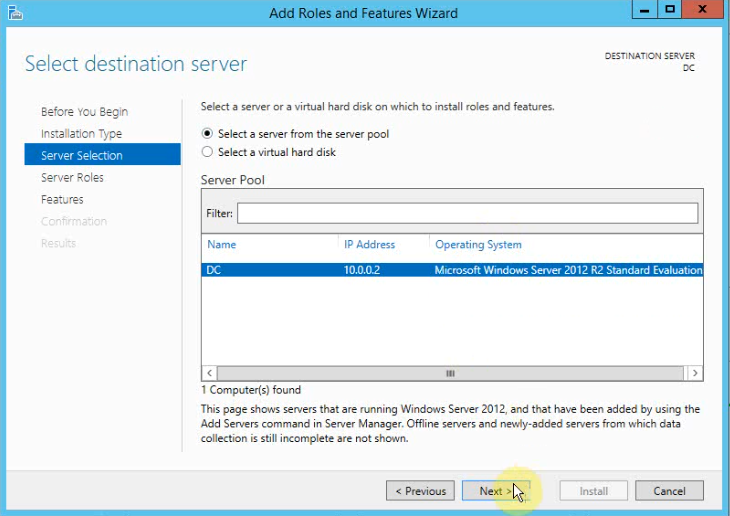
<p>Màn hình Select Destination Server, Chọn Select a Server from the server pool, Click Next</p>

<p><img alt="" height="516" loading="lazy" sizes="(max-width: 730px) 100vw, 730px" src="http://sinhvientot.net/wp-content/uploads/2017/04/5.png" srcset="https://sinhvientot.net/wp-content/uploads/2017/04/5.png 730w, https://sinhvientot.net/wp-content/uploads/2017/04/5-300x212.png 300w, https://sinhvientot.net/wp-content/uploads/2017/04/5-100x70.png 100w, https://sinhvientot.net/wp-content/uploads/2017/04/5-696x492.png 696w, https://sinhvientot.net/wp-content/uploads/2017/04/5-594x420.png 594w" width="730" /></p>

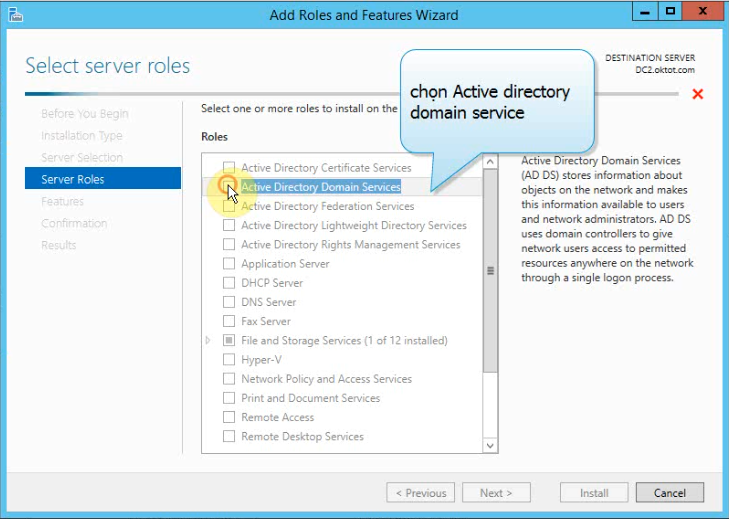
<p>Ở màn hình Select Server Roles, bạn đánh dấu chọn vào ô Active Directory Domain Services</p>

<p><img alt="" height="519" loading="lazy" sizes="(max-width: 729px) 100vw, 729px" src="http://sinhvientot.net/wp-content/uploads/2017/04/6.png" srcset="https://sinhvientot.net/wp-content/uploads/2017/04/6.png 729w, https://sinhvientot.net/wp-content/uploads/2017/04/6-300x214.png 300w, https://sinhvientot.net/wp-content/uploads/2017/04/6-100x70.png 100w, https://sinhvientot.net/wp-content/uploads/2017/04/6-696x496.png 696w, https://sinhvientot.net/wp-content/uploads/2017/04/6-590x420.png 590w" width="729" /></p>

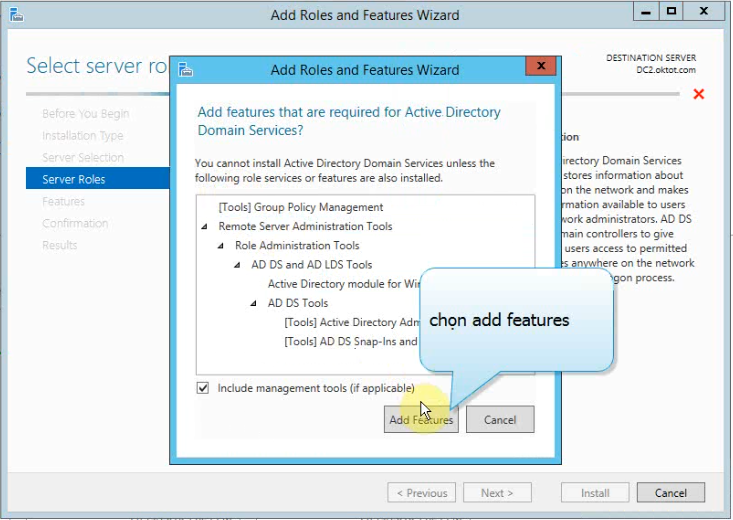
<p>Chương trình sẽ yêu cầu cài thêm các Features, bạn Click Add Features,</p>

<p><img alt="" height="520" loading="lazy" sizes="(max-width: 733px) 100vw, 733px" src="http://sinhvientot.net/wp-content/uploads/2017/04/7.png" srcset="https://sinhvientot.net/wp-content/uploads/2017/04/7.png 733w, https://sinhvientot.net/wp-content/uploads/2017/04/7-300x213.png 300w, https://sinhvientot.net/wp-content/uploads/2017/04/7-100x70.png 100w, https://sinhvientot.net/wp-content/uploads/2017/04/7-696x494.png 696w, https://sinhvientot.net/wp-content/uploads/2017/04/7-592x420.png 592w" width="733" /></p>

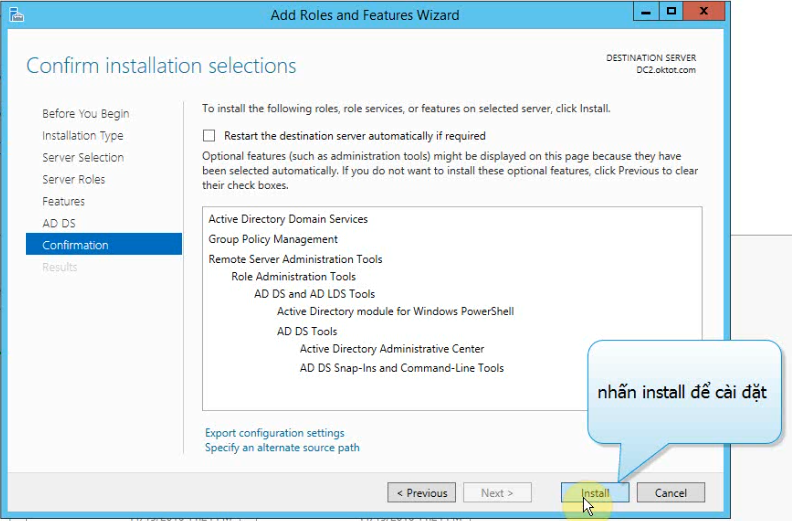
<p>Các bước còn lại bạn nhấn Next theo mặc định. Màn hình Confirm installation selections,đánh dấu chọn vào ô Restart the destination server automatically if required(hệ thống sẽ tự khởi động lại khi có yêu cầu), Click Install, để bắt đầu cài đặt</p>

<p><img alt="" height="521" loading="lazy" sizes="(max-width: 792px) 100vw, 792px" src="http://sinhvientot.net/wp-content/uploads/2017/04/8.png" srcset="https://sinhvientot.net/wp-content/uploads/2017/04/8.png 792w, https://sinhvientot.net/wp-content/uploads/2017/04/8-300x197.png 300w, https://sinhvientot.net/wp-content/uploads/2017/04/8-768x505.png 768w, https://sinhvientot.net/wp-content/uploads/2017/04/8-696x458.png 696w, https://sinhvientot.net/wp-content/uploads/2017/04/8-741x486.png 741w, https://sinhvientot.net/wp-content/uploads/2017/04/8-638x420.png 638w" width="792" /></p>

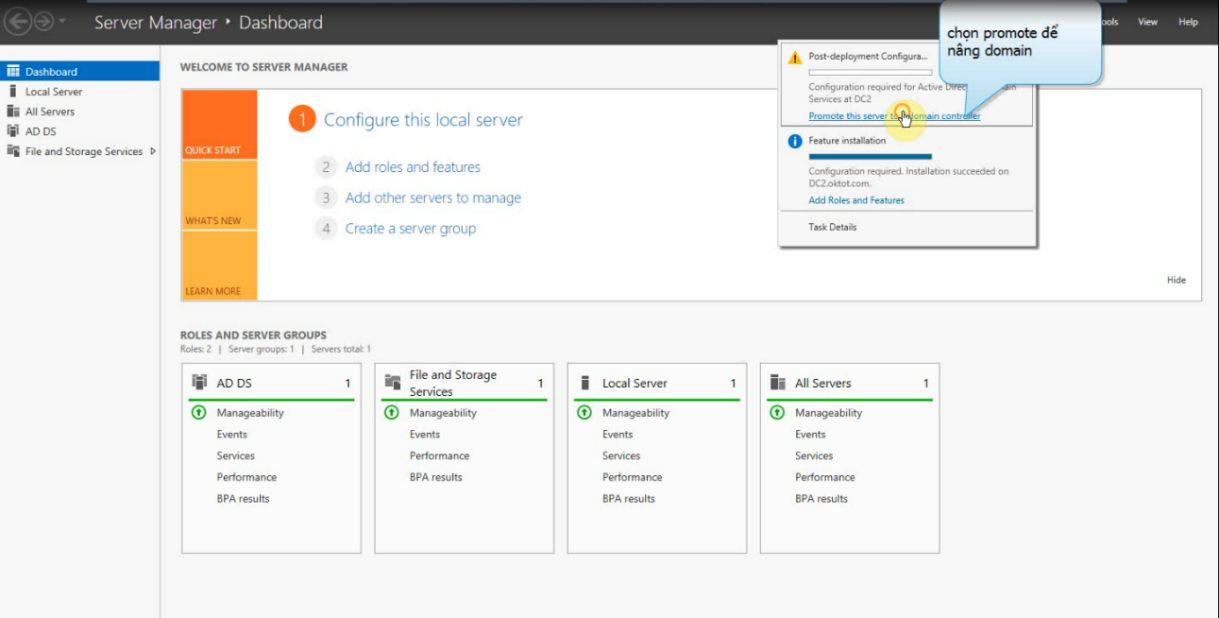
<p>Sau khi hoàn tất, màn hình Installation progress nhấp vào Promote this Server to a domain controller.</p>

<p><img alt="" height="618" loading="lazy" sizes="(max-width: 1219px) 100vw, 1219px" src="http://sinhvientot.net/wp-content/uploads/2017/04/9.png" srcset="https://sinhvientot.net/wp-content/uploads/2017/04/9.png 1219w, https://sinhvientot.net/wp-content/uploads/2017/04/9-300x152.png 300w, https://sinhvientot.net/wp-content/uploads/2017/04/9-768x389.png 768w, https://sinhvientot.net/wp-content/uploads/2017/04/9-1024x519.png 1024w, https://sinhvientot.net/wp-content/uploads/2017/04/9-696x353.png 696w, https://sinhvientot.net/wp-content/uploads/2017/04/9-1068x541.png 1068w, https://sinhvientot.net/wp-content/uploads/2017/04/9-828x420.png 828w" width="1219" /></p>

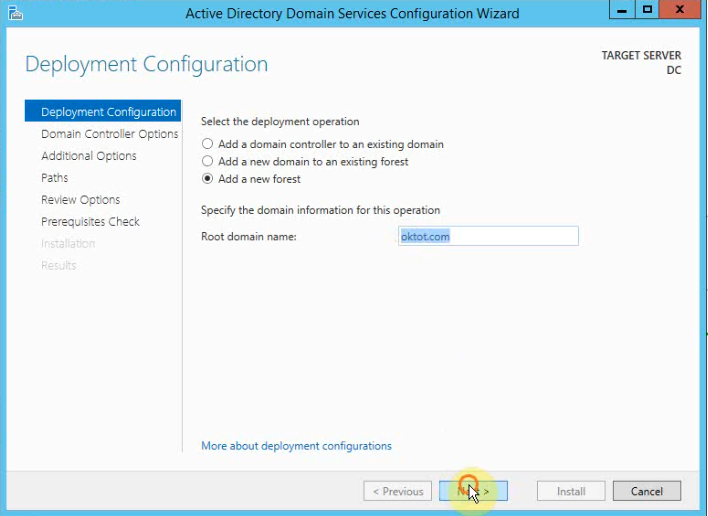
<p>Màn hình Deployment Configuration, chương trình cung cấp cho bạn ba tùy chọn:</p>

<ul>
	<li>Add a domain controller to an existing domain: Thêm một ADC vào domain có sẵn.</li>
	<li>Add a new domain to an existing forest: Xây dựng domain mới trong forest có sẵn.</li>
	<li>Add new forest: xây dựng máy DC đầu tiên của forest.</li>
</ul>

<p>Do chúng ta đang xây dựng DC đầu tiên nên Bạn chọn vào tùy chọn đầu tiên là Add a new forest.</p>

<p><em>Mục Specify the domain information for this operation</em>: nhập vào tên domain tên của công ty mà bạn muốn làm DC</p>

<p>Sau đó, click Next<img alt="" height="516" loading="lazy" sizes="(max-width: 708px) 100vw, 708px" src="http://sinhvientot.net/wp-content/uploads/2017/04/10.png" srcset="https://sinhvientot.net/wp-content/uploads/2017/04/10.png 708w, https://sinhvientot.net/wp-content/uploads/2017/04/10-300x219.png 300w, https://sinhvientot.net/wp-content/uploads/2017/04/10-324x235.png 324w, https://sinhvientot.net/wp-content/uploads/2017/04/10-696x507.png 696w, https://sinhvientot.net/wp-content/uploads/2017/04/10-576x420.png 576w" width="708" /></p>

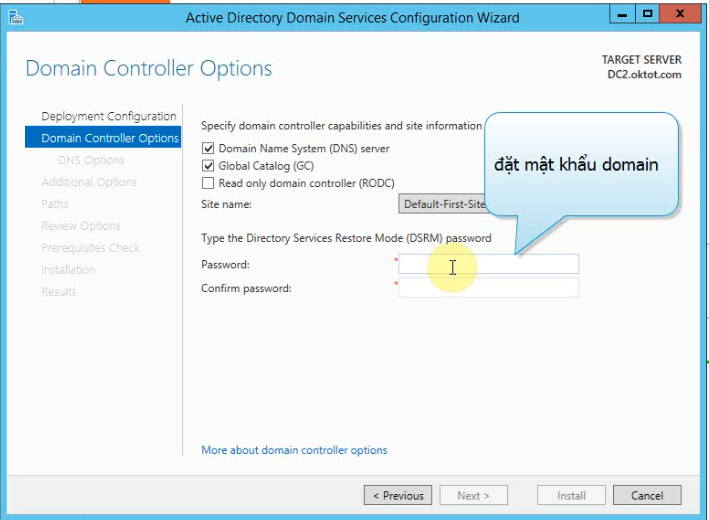
<p>Màn hình Domain Controller Options,Forest functional Level và Domain functional Level: tùy theo hệ thống của bạn đang sử dụng các phiên bản Windows Server nào thì ta chọn cho tương ứng. Chi tiết hơn bạn có thể xem thêm ở đây</p>

<p>Bạn đánh dấu chọn vào ô Domain Name System (DNS) server để cài đặt thêm DNS cho DC.</p>

<p>Tiếp theo bên dưới là ô Global Catalog (GC). Mục này bắt buộc vì DC đầu tiên cũng chính là GC.</p>

<p>Bên dưới là mục Type the Directory Services Restore Mode (DSRM) password, bạn nhập vào mật khẩu. Mật khẩu này dùng để khôi phục AD ở chế độ Restore Mode.</p>

<p>Lưu ý: Password nên bao gồm; ký tự hoa, thường, đặc biệt hoặc ký tự số và từ 7 ký tự trở lên, sau đó click Next,</p>

<p><img alt="" height="520" loading="lazy" sizes="(max-width: 709px) 100vw, 709px" src="http://sinhvientot.net/wp-content/uploads/2017/04/11.png" srcset="https://sinhvientot.net/wp-content/uploads/2017/04/11.png 709w, https://sinhvientot.net/wp-content/uploads/2017/04/11-300x220.png 300w, https://sinhvientot.net/wp-content/uploads/2017/04/11-80x60.png 80w, https://sinhvientot.net/wp-content/uploads/2017/04/11-696x510.png 696w, https://sinhvientot.net/wp-content/uploads/2017/04/11-573x420.png 573w" width="709" /></p>

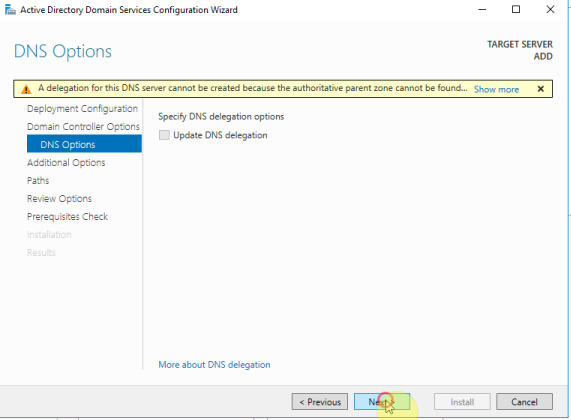
<p>Màn hình&nbsp;<em>DNS Options</em>, bạn Click Next,</p>

<p><img alt="" height="420" loading="lazy" sizes="(max-width: 571px) 100vw, 571px" src="http://sinhvientot.net/wp-content/uploads/2017/04/12.png" srcset="https://sinhvientot.net/wp-content/uploads/2017/04/12.png 571w, https://sinhvientot.net/wp-content/uploads/2017/04/12-300x221.png 300w, https://sinhvientot.net/wp-content/uploads/2017/04/12-80x60.png 80w" width="571" /></p>

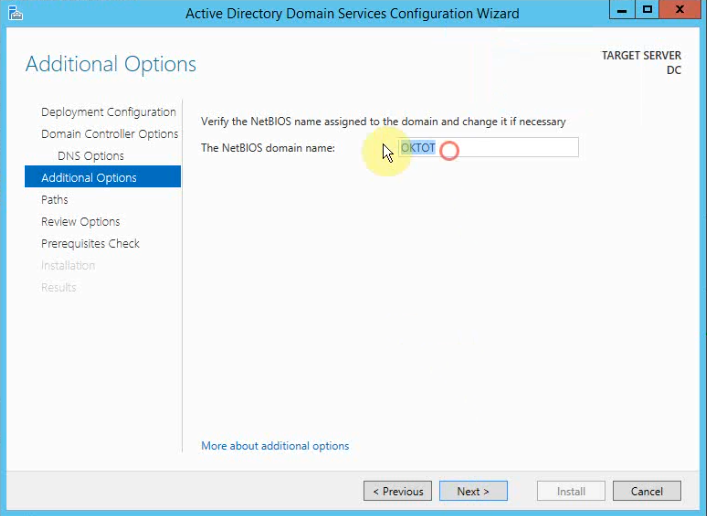
<p>Tại đây bạn có thể đặt lại tên NetBIOS domain name hoặc sử dụng tên mặc định, sau đó click next.</p>

<p><img alt="" height="516" loading="lazy" sizes="(max-width: 707px) 100vw, 707px" src="http://sinhvientot.net/wp-content/uploads/2017/04/13.png" srcset="https://sinhvientot.net/wp-content/uploads/2017/04/13.png 707w, https://sinhvientot.net/wp-content/uploads/2017/04/13-300x219.png 300w, https://sinhvientot.net/wp-content/uploads/2017/04/13-324x235.png 324w, https://sinhvientot.net/wp-content/uploads/2017/04/13-696x508.png 696w, https://sinhvientot.net/wp-content/uploads/2017/04/13-575x420.png 575w" width="707" /></p>

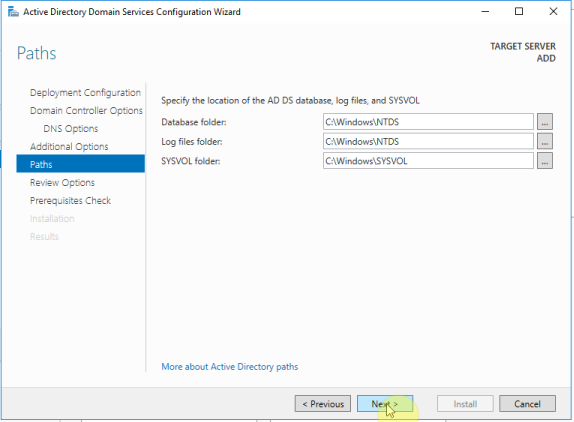
<p>Màn hình Paths, bạn trỏ đường dẫn đến nơi cần lưu cơ sở dữ liệu của PAD, log files và SYSVOL. click Next,</p>

<p><img alt="" height="422" loading="lazy" sizes="(max-width: 574px) 100vw, 574px" src="http://sinhvientot.net/wp-content/uploads/2017/04/14.png" srcset="https://sinhvientot.net/wp-content/uploads/2017/04/14.png 574w, https://sinhvientot.net/wp-content/uploads/2017/04/14-300x221.png 300w, https://sinhvientot.net/wp-content/uploads/2017/04/14-80x60.png 80w, https://sinhvientot.net/wp-content/uploads/2017/04/14-571x420.png 571w" width="574" /></p>

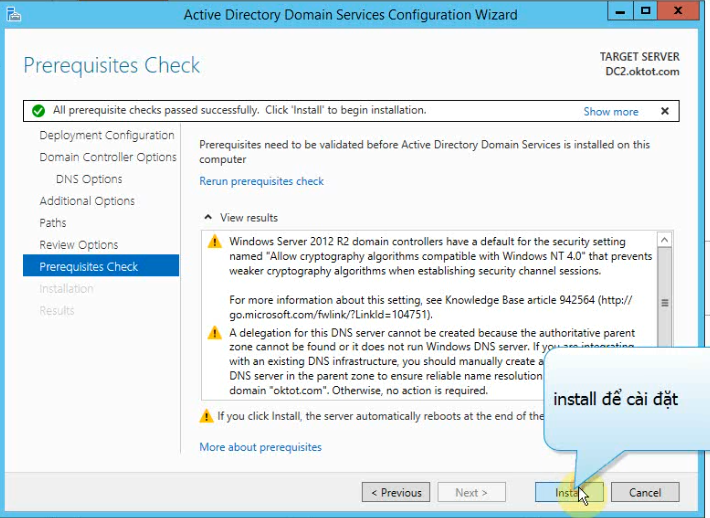
<p>Các bước còn lại nhấn Next theo mặc định. Màn hình Prerequisites Check, khi bạn nhận được thông báo “All prerequisites check passed successfully” nghĩa là quá trình kiểm tra điều kiện để cài đặt DC đã thành công. Click Install để bắt đầu cài đặt.</p>

<p><img alt="" height="518" loading="lazy" sizes="(max-width: 710px) 100vw, 710px" src="http://sinhvientot.net/wp-content/uploads/2017/04/15.png" srcset="https://sinhvientot.net/wp-content/uploads/2017/04/15.png 710w, https://sinhvientot.net/wp-content/uploads/2017/04/15-300x219.png 300w, https://sinhvientot.net/wp-content/uploads/2017/04/15-324x235.png 324w, https://sinhvientot.net/wp-content/uploads/2017/04/15-696x508.png 696w, https://sinhvientot.net/wp-content/uploads/2017/04/15-576x420.png 576w" width="710" /></p>

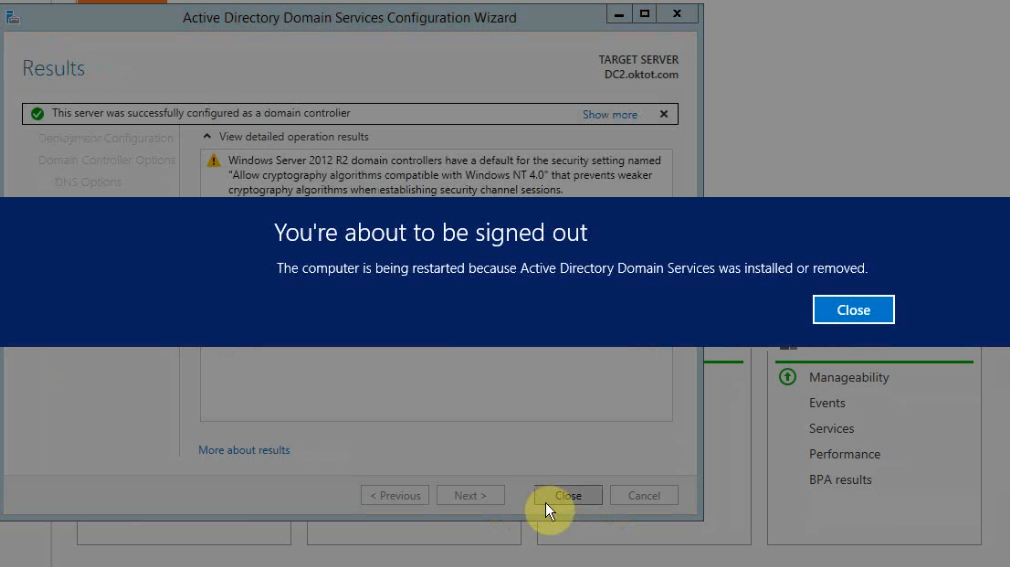
<p>Sau khi cài đặt hoàn tất, bạn phải khởi động lại máy tính để hoàn thành quá trình xây dựng Active Directory Domain Services.</p>

<p><img alt="" height="567" loading="lazy" sizes="(max-width: 1010px) 100vw, 1010px" src="http://sinhvientot.net/wp-content/uploads/2017/04/16.png" srcset="https://sinhvientot.net/wp-content/uploads/2017/04/16.png 1010w, https://sinhvientot.net/wp-content/uploads/2017/04/16-300x168.png 300w, https://sinhvientot.net/wp-content/uploads/2017/04/16-768x431.png 768w, https://sinhvientot.net/wp-content/uploads/2017/04/16-696x391.png 696w, https://sinhvientot.net/wp-content/uploads/2017/04/16-748x420.png 748w" width="1010" /></p>

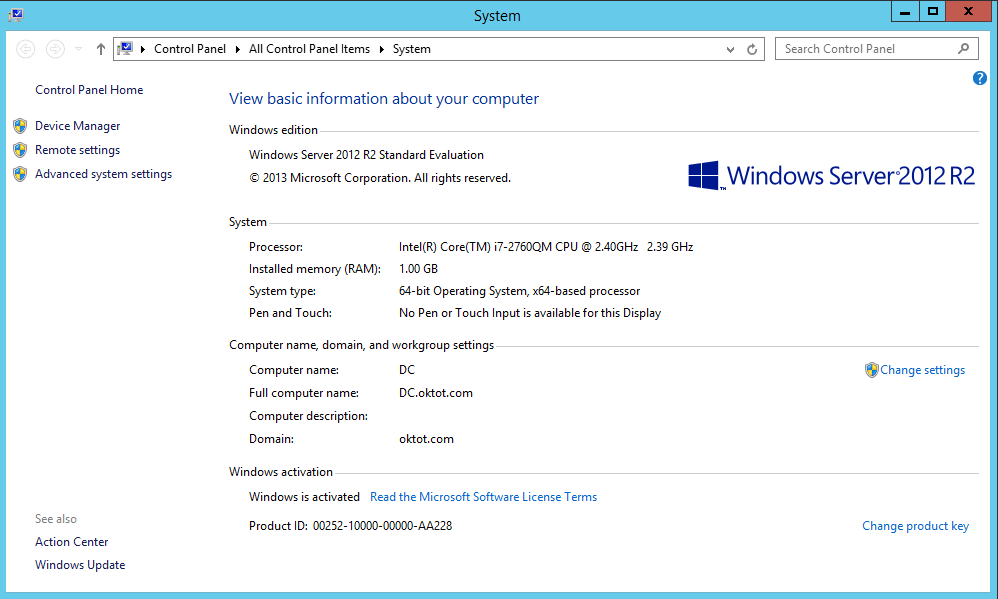
<p>Đã được nâng lên domain &gt; Hoàn thành triển khai domain controller.</p>

<p><img alt="" height="599" loading="lazy" sizes="(max-width: 998px) 100vw, 998px" src="http://sinhvientot.net/wp-content/uploads/2017/04/17.png" srcset="https://sinhvientot.net/wp-content/uploads/2017/04/17.png 998w, https://sinhvientot.net/wp-content/uploads/2017/04/17-300x180.png 300w, https://sinhvientot.net/wp-content/uploads/2017/04/17-768x461.png 768w, https://sinhvientot.net/wp-content/uploads/2017/04/17-696x418.png 696w, https://sinhvientot.net/wp-content/uploads/2017/04/17-700x420.png 700w" width="998" /></p>

<p>Video hướng dẫn</p>

<p><iframe allowfullscreen="" frameborder="0" height="360" src="https://www.youtube.com/embed/videoseries?list=PLzyc2zR5kkdfWS0GG_B8ZG67cWq5MSMxK" width="100%"></iframe></p>
		</div>
	</div>
	<div id="footer" class="clearfix">
		<div id="url">
			<strong>URL của bản tin này: </strong><a href="http://thienhashop.com/news/huong-dan-phan-mem/xay-dung-domain-controller-tren-nen-window-server-2012-172.html" title="Xây dựng Domain Controller trên nền Window server 2012">http://thienhashop.com/news/huong-dan-phan-mem/xay-dung-domain-controller-tren-nen-window-server-2012-172.html</a>

		</div>
		<div class="clear"></div>
		<div class="copyright">
			&copy; PHAN MEM THIEN HA
		</div>
		<div id="contact">
			<a href="mailto:phamhuy842005@gmail.com">phamhuy842005@gmail.com</a>
		</div>
	</div>
</div>
        <div id="timeoutsess" class="chromeframe">
            Bạn đã không sử dụng Site, <a onclick="timeoutsesscancel();" href="http://thienhashop.com/#">Bấm vào đây để duy trì trạng thái đăng nhập</a>. Thời gian chờ: <span id="secField"> 60 </span> giây
        </div>
        <div id="openidResult" class="nv-alert" style="display:none"></div>
        <div id="openidBt" data-result="" data-redirect=""></div>
<script src="http://thienhashop.com/assets/js/jquery/jquery.min.js"></script>
<script>var nv_base_siteurl="/",nv_lang_data="vi",nv_lang_interface="vi",nv_name_variable="nv",nv_fc_variable="op",nv_lang_variable="language",nv_module_name="news",nv_func_name="savefile",nv_is_user=0, nv_my_ofs=7,nv_my_abbr="ICT",nv_cookie_prefix="nv4c_y8Y7D",nv_check_pass_mstime=1738000,nv_area_admin=0,nv_safemode=0,theme_responsive=1,nv_is_recaptcha=1,nv_recaptcha_sitekey="6LeSarIUAAAAAHRq6xkHwO6J0YYQOdMxgqKTXoL_",nv_recaptcha_type="image",nv_recaptcha_elements=[];</script>
<script src="http://thienhashop.com/assets/js/language/vi.js"></script>
<script src="http://thienhashop.com/assets/js/global.js"></script>
<script src="http://thienhashop.com/themes/default/js/news.js"></script>
<script src="http://thienhashop.com/themes/popovleather/js/main.js"></script>
<script src="http://thienhashop.com/themes/popovleather/js/bootstrap.min.js"></script>
</body>
</html>