<!DOCTYPE html>
	<html lang="vi" xmlns="http://www.w3.org/1999/xhtml" prefix="og: http://ogp.me/ns#">
	<head>
<title>Activate Microsoft Office 2016</title>
<meta name="description" content="Activate Microsoft Office 2016 - Savefile - Tin Tức - https&#x3A;&#x002F;&#x002F;thienhashop.com&#x002F;news&#x002F;savefile&#x002F;huong-dan-phan-mem&#x002F;activate-microsoft-office-2016-169.html">
<meta name="author" content="PHAN MEM THIEN HA">
<meta name="copyright" content="PHAN MEM THIEN HA [phamhuy842005@gmail.com]">
<meta name="robots" content="index, archive, follow, noodp">
<meta name="googlebot" content="index,archive,follow,noodp">
<meta name="msnbot" content="all,index,follow">
<meta name="generator" content="NukeViet v4.0">
<meta name="viewport" content="width=device-width, initial-scale=1">
<meta http-equiv="Content-Type" content="text/html; charset=utf-8">
<meta property="og:title" content="Activate Microsoft Office 2016">
<meta property="og:type" content="website">
<meta property="og:description" content="Savefile - Tin Tức - https&#x3A;&#x002F;&#x002F;thienhashop.com&#x002F;news&#x002F;savefile&#x002F;huong-dan-phan-mem&#x002F;activate-microsoft-office-2016-169.html">
<meta property="og:site_name" content="PHAN MEM THIEN HA">
<meta property="og:url" content="https://phanmemthienha.com/news/huong-dan-phan-mem/activate-microsoft-office-2016-169.html">
<link rel="shortcut icon" href="https://thienhashop.com/uploads/logo-shop-thien-ha-5.png">
<link rel="canonical" href="https://phanmemthienha.com/news/huong-dan-phan-mem/activate-microsoft-office-2016-169.html">
<link rel="alternate" href="https://thienhashop.com/news/rss/" title="Tin Tức" type="application/rss+xml">
<link rel="alternate" href="https://thienhashop.com/news/rss/huong-dan-phan-mem/" title="Tin Tức - Hướng dẫn phần mềm" type="application/rss+xml">
<link rel="alternate" href="https://thienhashop.com/news/rss/huong-dan-noi-bo/" title="Tin Tức - Hướng dẫn nội bộ" type="application/rss+xml">
<link rel="alternate" href="https://thienhashop.com/news/rss/Doi-tac/" title="Tin Tức - Đối tác" type="application/rss+xml">
<link rel="alternate" href="https://thienhashop.com/news/rss/Tuyen-dung/" title="Tin Tức - Tuyển dụng" type="application/rss+xml">
<link rel="preload" as="script" href="https://thienhashop.com/assets/js/jquery/jquery.min.js">
<link rel="preload" as="script" href="https://thienhashop.com/assets/js/language/vi.js">
<link rel="preload" as="script" href="https://thienhashop.com/assets/js/global.js">
<link rel="preload" as="script" href="https://thienhashop.com/themes/default/js/news.js">
<link rel="preload" as="script" href="https://thienhashop.com/themes/popovleather/js/main.js">
<link rel="preload" as="script" href="https://thienhashop.com/themes/popovleather/js/bootstrap.min.js">
<link rel="StyleSheet" href="https://thienhashop.com/assets/css/font-awesome.min.css">
<link rel="StyleSheet" href="https://thienhashop.com/themes/popovleather/css/bootstrap.min.css">
<link rel="StyleSheet" href="https://thienhashop.com/themes/popovleather/css/style.css">
<link rel="StyleSheet" href="https://thienhashop.com/themes/popovleather/css/style.responsive.css">
<link rel="StyleSheet" href="https://thienhashop.com/themes/default/css/news.css">
<link rel="StyleSheet" href="https://thienhashop.com/assets/css/popovleather.vi.0.css?t=87">
<style>
	body{background: #fff;}
</style>
	</head>
	<body>
<div id="print">
	<div id="hd_print">
		<h2 class="pull-left">PHAN MEM THIEN HA</h2>
		<p class="pull-right"><a title="PHAN MEM THIEN HA" href="https://thienhashop.com/">https://thienhashop.com</a></p>
	</div>
	<div class="clear"></div>
	<hr />
	<div id="content">
		<h1>Activate Microsoft Office 2016</h1>
		<ul class="list-inline">
			<li>Thứ hai - 27/07/2020 23:27</li>
			<li class="hidden-print txtrequired"><em class="fa fa-print">&nbsp;</em><a title="In ra" href="javascript:;" onclick="window.print()">In ra</a></li>
			<li class="hidden-print txtrequired"><em class="fa fa-power-off">&nbsp;</em><a title="Đóng cửa sổ này" href="javascript:;" onclick="window.close()">Đóng cửa sổ này</a></li>
		</ul>
		<div class="clear"></div>
		<div id="hometext">
			Activate Microsoft Office 2016
		</div>
				<div class="imghome">
			<img alt="Activate Microsoft Office 2016" src="https://thienhashop.com/uploads/news/2020_07/cmd.jpg" width="460" class="img-thumbnail" />
		</div>
		<div class="clear"></div>
		<div id="bodytext" class="clearfix">
			<p>Step 1. After installing Microsoft Office 2016.</p>

<p>Step 2. Copy the Code below:</p>

<pre>
<code>@echo off
title Activate Microsoft Office 2016 ALL versions for FREE!&amp;cls&amp;echo ============================================================================&amp;echo #Project: Activating Microsoft software products for FREE without software&amp;echo ============================================================================&amp;echo.&amp;echo #Supported products:&amp;echo - Microsoft Office Standard 2016&amp;echo - Microsoft Office Professional Plus 2016&amp;echo.&amp;echo.&amp;(if exist &quot;%ProgramFiles%\Microsoft Office\Office16\ospp.vbs&quot; cd /d &quot;%ProgramFiles%\Microsoft Office\Office16&quot;)&amp;(if exist &quot;%ProgramFiles(x86)%\Microsoft Office\Office16\ospp.vbs&quot; cd /d &quot;%ProgramFiles(x86)%\Microsoft Office\Office16&quot;)&amp;(for /f %%x in (&#039;dir /b ..\root\Licenses16\proplusvl_kms*.xrm-ms&#039;) do cscript ospp.vbs /inslic:&quot;..\root\Licenses16\%%x&quot; &gt;nul)&amp;(for /f %%x in (&#039;dir /b ..\root\Licenses16\proplusvl_mak*.xrm-ms&#039;) do cscript ospp.vbs /inslic:&quot;..\root\Licenses16\%%x&quot; &gt;nul)&amp;echo.&amp;echo ============================================================================&amp;echo Activating your Office...&amp;cscript //nologo ospp.vbs /unpkey:WFG99 &gt;nul&amp;cscript //nologo ospp.vbs /unpkey:DRTFM &gt;nul&amp;cscript //nologo ospp.vbs /unpkey:BTDRB &gt;nul&amp;cscript //nologo ospp.vbs /unpkey:CPQVG &gt;nul&amp;cscript //nologo ospp.vbs /inpkey:XQNVK-8JYDB-WJ9W3-YJ8YR-WFG99 &gt;nul&amp;set i=1
:server
if %i%==1 set KMS_Sev=kms7.MSGuides.com
if %i%==2 set KMS_Sev=kms8.MSGuides.com
if %i%==3 set KMS_Sev=kms9.MSGuides.com
if %i%==4 goto notsupported
cscript //nologo ospp.vbs /sethst:%KMS_Sev% &gt;nul&amp;echo ============================================================================&amp;echo.&amp;echo.
cscript //nologo ospp.vbs /act | find /i &quot;successful&quot; &amp;&amp; (echo.&amp;echo ============================================================================&amp;echo.&amp;echo #My official blog: MSGuides.com&amp;echo.&amp;echo #How it works: bit.ly/kms-server&amp;echo.&amp;echo #Please feel free to contact me at msguides.com@gmail.com if you have any questions or concerns.&amp;echo.&amp;echo #Please consider supporting this project: donate.msguides.com&amp;echo #Your support is helping me keep my servers running everyday!&amp;echo.&amp;echo ============================================================================&amp;choice /n /c YN /m &quot;Would you like to visit my blog &#91;Y,N&#93;?&quot; &amp; if errorlevel 2 exit) || (echo The connection to my KMS server failed! Trying to connect to another one... &amp; echo Please wait... &amp; echo. &amp; echo. &amp; set /a i+=1 &amp; goto server)
explorer &quot;http://MSGuides.com&quot;&amp;goto halt
:notsupported
echo.&amp;echo ============================================================================&amp;echo Sorry! Your version is not supported.&amp;echo Please try installing the latest version here: bit.ly/odt2k16
:halt
pause &gt;nul</code></pre>

<p>Step 3. Open Notepad. Paste the Code and save as&nbsp;<strong>Office2016.cmd</strong>. Close Notepad.</p>

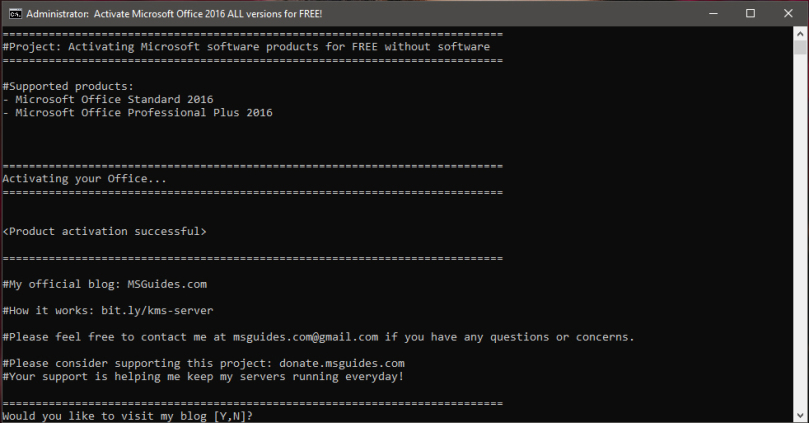
<p>Step 4. Right click&nbsp;<strong>Office2016.cmd</strong>&nbsp;file and select&nbsp;<strong>run as administrator</strong>.</p>

<p><img alt="cmd" data-attachment-id="207" data-comments-opened="1" data-image-description="" data-image-meta="{&#039;aperture&#039;:&#039;0&#039;,&#039;credit&#039;:&#039;&#039;,&#039;camera&#039;:&#039;&#039;,&#039;caption&#039;:&#039;&#039;,&#039;created_timestamp&#039;:&#039;0&#039;,&#039;copyright&#039;:&#039;&#039;,&#039;focal_length&#039;:&#039;0&#039;,&#039;iso&#039;:&#039;0&#039;,&#039;shutter_speed&#039;:&#039;0&#039;,&#039;title&#039;:&#039;&#039;,&#039;orientation&#039;:&#039;1&#039;}" data-image-title="cmd" data-large-file="https://hackerkitty.files.wordpress.com/2018/09/cmd.jpg?w=809" data-medium-file="https://hackerkitty.files.wordpress.com/2018/09/cmd.jpg?w=300" data-orig-file="https://hackerkitty.files.wordpress.com/2018/09/cmd.jpg" data-orig-size="982,513" data-permalink="https://hackerkitty.wordpress.com/2018/09/26/activate-office-2016/cmd/" height="423" sizes="(max-width: 809px) 100vw, 809px" src="https://thienhashop.com/uploads/news/2020_07/cmd.jpg" srcset="https://hackerkitty.files.wordpress.com/2018/09/cmd.jpg?w=809 809w, https://hackerkitty.files.wordpress.com/2018/09/cmd.jpg?w=150 150w, https://hackerkitty.files.wordpress.com/2018/09/cmd.jpg?w=300 300w, https://hackerkitty.files.wordpress.com/2018/09/cmd.jpg?w=768 768w, https://hackerkitty.files.wordpress.com/2018/09/cmd.jpg 982w" width="809" /></p>

<p>Step 5. Close&nbsp;<b>Command Prompt</b>. Check&nbsp;Microsoft Word or any Office file to see&nbsp;Microsoft Office 2016 activated.</p>

<p>All Done!</p>

<p><br  />
<br  />
<br  />
<br  />
<br  />
&nbsp;</p>
		</div>
	</div>
	<div id="footer" class="clearfix">
		<div id="url">
			<strong>URL của bản tin này: </strong><a href="https://thienhashop.com/news/huong-dan-phan-mem/activate-microsoft-office-2016-169.html" title="Activate Microsoft Office 2016">https://thienhashop.com/news/huong-dan-phan-mem/activate-microsoft-office-2016-169.html</a>

		</div>
		<div class="clear"></div>
		<div class="copyright">
			&copy; PHAN MEM THIEN HA
		</div>
		<div id="contact">
			<a href="mailto:phamhuy842005@gmail.com">phamhuy842005@gmail.com</a>
		</div>
	</div>
</div>
        <div id="timeoutsess" class="chromeframe">
            Bạn đã không sử dụng Site, <a onclick="timeoutsesscancel();" href="https://thienhashop.com/#">Bấm vào đây để duy trì trạng thái đăng nhập</a>. Thời gian chờ: <span id="secField"> 60 </span> giây
        </div>
        <div id="openidResult" class="nv-alert" style="display:none"></div>
        <div id="openidBt" data-result="" data-redirect=""></div>
<script src="https://thienhashop.com/assets/js/jquery/jquery.min.js"></script>
<script>var nv_base_siteurl="/",nv_lang_data="vi",nv_lang_interface="vi",nv_name_variable="nv",nv_fc_variable="op",nv_lang_variable="language",nv_module_name="news",nv_func_name="savefile",nv_is_user=0, nv_my_ofs=-4,nv_my_abbr="EDT",nv_cookie_prefix="nv4c_y8Y7D",nv_check_pass_mstime=1738000,nv_area_admin=0,nv_safemode=0,theme_responsive=1,nv_is_recaptcha=1,nv_recaptcha_sitekey="6LeSarIUAAAAAHRq6xkHwO6J0YYQOdMxgqKTXoL_",nv_recaptcha_type="image",nv_recaptcha_elements=[];</script>
<script src="https://thienhashop.com/assets/js/language/vi.js"></script>
<script src="https://thienhashop.com/assets/js/global.js"></script>
<script src="https://thienhashop.com/themes/default/js/news.js"></script>
<script src="https://thienhashop.com/themes/popovleather/js/main.js"></script>
<script src="https://thienhashop.com/themes/popovleather/js/bootstrap.min.js"></script>
</body>
</html>