<!DOCTYPE html>
	<html lang="vi" xmlns="http://www.w3.org/1999/xhtml" prefix="og: http://ogp.me/ns#">
	<head>
<title>Mã lỗi chia sẻ máy in trên Windows 11 22H2</title>
<meta name="description" content="Mã lỗi chia sẻ máy in trên Windows 11 22H2 - Savefile - Tin Tức -...">
<meta name="author" content="PHAN MEM THIEN HA">
<meta name="copyright" content="PHAN MEM THIEN HA [phamhuy842005@gmail.com]">
<meta name="robots" content="index, archive, follow, noodp">
<meta name="googlebot" content="index,archive,follow,noodp">
<meta name="msnbot" content="all,index,follow">
<meta name="generator" content="NukeViet v4.0">
<meta name="viewport" content="width=device-width, initial-scale=1">
<meta http-equiv="Content-Type" content="text/html; charset=utf-8">
<meta property="og:title" content="Mã lỗi chia sẻ máy in trên Windows 11 22H2">
<meta property="og:type" content="website">
<meta property="og:description" content="Savefile - Tin Tức - https&#x3A;&#x002F;&#x002F;thienhashop.com&#x002F;news&#x002F;savefile&#x002F;huong-dan-phan-mem&#x002F;ma-loi-chia-se-may-in-tren-windows-11-22h2-203.html">
<meta property="og:site_name" content="PHAN MEM THIEN HA">
<meta property="og:url" content="https://phanmemthienha.com/news/huong-dan-phan-mem/ma-loi-chia-se-may-in-tren-windows-11-22h2-203.html">
<link rel="shortcut icon" href="https://thienhashop.com/uploads/logo-shop-thien-ha-5.png">
<link rel="canonical" href="https://phanmemthienha.com/news/huong-dan-phan-mem/ma-loi-chia-se-may-in-tren-windows-11-22h2-203.html">
<link rel="alternate" href="https://thienhashop.com/news/rss/" title="Tin Tức" type="application/rss+xml">
<link rel="alternate" href="https://thienhashop.com/news/rss/huong-dan-phan-mem/" title="Tin Tức - Hướng dẫn phần mềm" type="application/rss+xml">
<link rel="alternate" href="https://thienhashop.com/news/rss/huong-dan-noi-bo/" title="Tin Tức - Hướng dẫn nội bộ" type="application/rss+xml">
<link rel="alternate" href="https://thienhashop.com/news/rss/Doi-tac/" title="Tin Tức - Đối tác" type="application/rss+xml">
<link rel="alternate" href="https://thienhashop.com/news/rss/Tuyen-dung/" title="Tin Tức - Tuyển dụng" type="application/rss+xml">
<link rel="preload" as="script" href="https://thienhashop.com/assets/js/jquery/jquery.min.js">
<link rel="preload" as="script" href="https://thienhashop.com/assets/js/language/vi.js">
<link rel="preload" as="script" href="https://thienhashop.com/assets/js/global.js">
<link rel="preload" as="script" href="https://thienhashop.com/themes/default/js/news.js">
<link rel="preload" as="script" href="https://thienhashop.com/themes/popovleather/js/main.js">
<link rel="preload" as="script" href="https://thienhashop.com/themes/popovleather/js/bootstrap.min.js">
<link rel="StyleSheet" href="https://thienhashop.com/assets/css/font-awesome.min.css">
<link rel="StyleSheet" href="https://thienhashop.com/themes/popovleather/css/bootstrap.min.css">
<link rel="StyleSheet" href="https://thienhashop.com/themes/popovleather/css/style.css">
<link rel="StyleSheet" href="https://thienhashop.com/themes/popovleather/css/style.responsive.css">
<link rel="StyleSheet" href="https://thienhashop.com/themes/default/css/news.css">
<link rel="StyleSheet" href="https://thienhashop.com/assets/css/popovleather.vi.0.css?t=87">
<style>
	body{background: #fff;}
</style>
	</head>
	<body>
<div id="print">
	<div id="hd_print">
		<h2 class="pull-left">PHAN MEM THIEN HA</h2>
		<p class="pull-right"><a title="PHAN MEM THIEN HA" href="https://thienhashop.com/">https://thienhashop.com</a></p>
	</div>
	<div class="clear"></div>
	<hr />
	<div id="content">
		<h1>Mã lỗi chia sẻ máy in trên Windows 11 22H2</h1>
		<ul class="list-inline">
			<li>Thứ tư - 17/05/2023 22:16</li>
			<li class="hidden-print txtrequired"><em class="fa fa-print">&nbsp;</em><a title="In ra" href="javascript:;" onclick="window.print()">In ra</a></li>
			<li class="hidden-print txtrequired"><em class="fa fa-power-off">&nbsp;</em><a title="Đóng cửa sổ này" href="javascript:;" onclick="window.close()">Đóng cửa sổ này</a></li>
		</ul>
		<div class="clear"></div>
		<div id="hometext">
			Mã lỗi chia sẻ máy in trên Windows 11 22H2
		</div>
		<div id="bodytext" class="clearfix">
			<span style="font-size:12pt"><span style="background:white"><span style="line-height:34.5pt"><span style="font-family:&#039;Times New Roman&#039;,serif"><span style="font-size:27.0pt"><span style="color:rgb(51, 51, 51);">Mã lỗi chia sẻ máy in trên Windows 11 22H2</span></span></span></span></span></span>
<ul>
	<li style="margin:0in 0in 8pt"><span style="font-size:12pt"><span style="background:white"><span style="color:rgb(68, 68, 68);"><span style="line-height:normal"><span style="tab-stops:list .5in"><span style="font-family:&#039;Times New Roman&#039;,serif">0x00000bc4 – ERROR_PRINTER_NOT_FOUND</span></span></span></span></span></span></li>
	<li style="margin:0in 0in 8pt"><span style="font-size:12pt"><span style="background:white"><span style="color:rgb(68, 68, 68);"><span style="line-height:normal"><span style="tab-stops:list .5in"><span style="font-family:&#039;Times New Roman&#039;,serif">0x00000709 – ERROR_INVALID_PRINTER_NAME</span></span></span></span></span></span></li>
	<li style="margin:0in 0in 8pt"><span style="font-size:12pt"><span style="background:white"><span style="color:rgb(68, 68, 68);"><span style="line-height:normal"><span style="tab-stops:list .5in"><span style="font-family:&#039;Times New Roman&#039;,serif">Operation could not be completed</span></span></span></span></span></span></li>
	<li style="margin:0in 0in 8pt"><span style="font-size:12pt"><span style="background:white"><span style="color:rgb(68, 68, 68);"><span style="line-height:normal"><span style="tab-stops:list .5in"><span style="font-family:&#039;Times New Roman&#039;,serif">No Printers Were Found.</span></span></span></span></span></span></li>
	<li style="margin:0in 0in 8pt"><span style="font-size:12pt"><span style="background:white"><span style="color:rgb(68, 68, 68);"><span style="line-height:normal"><span style="tab-stops:list .5in"><span style="font-family:&#039;Times New Roman&#039;,serif">The printer name is invalid.</span></span></span></span></span></span></li>
</ul>

<h3 style="margin-top:0in; margin-right:0in; margin-bottom:5.25pt; margin-left:0in"><span style="font-size:13.5pt"><span style="background:white"><span style="line-height:34.5pt"><span style="font-family:&#039;Times New Roman&#039;,serif"><span style="font-weight:bold"><span style="font-size:27.0pt"><span style="color:rgb(51, 51, 51);"><span style="font-weight:normal">Cách 1: Sử dụng Local Group Policy Editor</span></span></span></span></span></span></span></span></h3>
<span style="font-size:12pt"><span style="background:white"><span style="font-family:&#039;Times New Roman&#039;,serif"><span style="color:rgb(68, 68, 68);">Mở search của Windows hoặc RUN, gõ gpedit.msc để mở Local Group Policy Editor và theo đường dẫn:</span></span></span></span><br  />
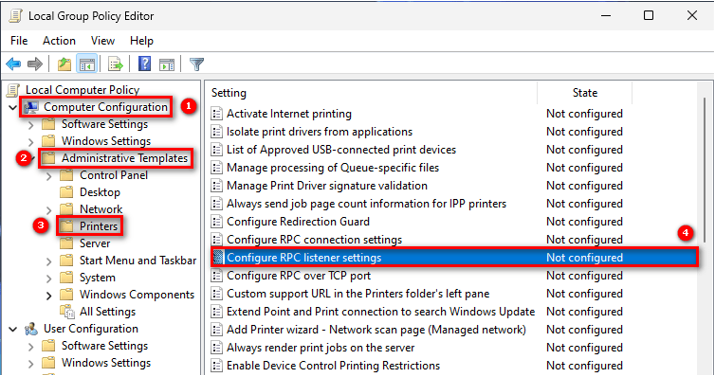
<span style="font-size:12pt"><span style="background:white"><span style="font-family:&#039;Times New Roman&#039;,serif"><strong><span style="color:rgb(68, 68, 68);">Computer Configuration</span></strong><span style="color:rgb(68, 68, 68);">&nbsp;–&nbsp;<strong>Administrative Templates</strong>&nbsp;–&nbsp;<strong>Printers</strong>, rồi click vào&nbsp;<strong>Configure RPC connection settings</strong></span></span></span></span><br  />
<img alt="" height="375" src="https://thienhashop.com/uploads/news/2023_05/image-20230518091557-1.png" width="714" /><span style="font-size:12pt"><span style="background:white"><span style="font-family:&#039;Times New Roman&#039;,serif"><span style="color:black"> </span></span></span></span><br  />
<span style="font-size:12pt"><span style="background:white"><span style="font-family:&#039;Times New Roman&#039;,serif"><span style="color:rgb(68, 68, 68);">Chọn&nbsp;<strong>Enabled</strong>&nbsp;rồi nhấn&nbsp;<strong>Apply&nbsp;</strong>và&nbsp;<strong>OK</strong>&nbsp;là hoàn thành. Bạn cần khởi động lại để áp dụng thay đổi và thử kết nối máy in.</span></span></span></span>

<h1 style="margin-top:0in; margin-right:0in; margin-bottom:5.25pt; margin-left:0in; margin:12pt 0in 0in"><span style="font-size:16pt"><span style="background:white"><span style="line-height:48.75pt"><span style="font-family:&#039;Calibri Light&#039;,sans-serif"><span style="color:rgb(47, 84, 150);"><span style="font-weight:normal"><b><span style="font-size:41.5pt"><span style="font-family:&#039;Times New Roman&#039;,serif"><span style="color:rgb(51, 51, 51);">Khắc Phục Lỗi Chia Sẻ Máy In Trên Windows 11</span></span></span></b></span></span></span></span></span></span></h1>
<span style="font-size:12pt"><span style="background:white"><span style="font-family:&#039;Times New Roman&#039;,serif"><span style="color:rgb(68, 68, 68);">Windows 11, bắt đầu từ&nbsp;phiên bản&nbsp;22H2&nbsp;, dịch vụ in qua mạng đã thay đổi từ “RPC qua Named Pipes” thành “RPC qua TCP”. Theo Microsoft, thay đổi mới sẽ giúp cải thiện tính bảo mật của máy in vì nó thực thi các phương thức liên lạc mới hơn và an toàn hơn. Tuy nhiên, thay đổi này khiến việc chia sẻ máy in khó khăn và Lê Hà Blog nhận được rất nhiều bình luận về vấn đề này. Bài viết này sẽ hướng dẫn bạn khắc phục vấn đề này.</span></span></span></span>

<h3 style="margin-top:0in; margin-right:0in; margin-bottom:5.25pt; margin-left:0in"><span style="font-size:13.5pt"><span style="background:white"><span style="line-height:34.5pt"><span style="font-family:&#039;Times New Roman&#039;,serif"><span style="font-weight:bold"><span style="font-size:27.0pt"><span style="color:rgb(51, 51, 51);"><span style="font-weight:normal">Mã lỗi chia sẻ máy in trên Windows 11 22H2</span></span></span></span></span></span></span></span></h3>

<ul>
	<li style="margin:0in 0in 8pt"><span style="font-size:12pt"><span style="background:white"><span style="color:rgb(68, 68, 68);"><span style="line-height:normal"><span style="tab-stops:list .5in"><span style="font-family:&#039;Times New Roman&#039;,serif">0x00000bc4 – ERROR_PRINTER_NOT_FOUND</span></span></span></span></span></span></li>
	<li style="margin:0in 0in 8pt"><span style="font-size:12pt"><span style="background:white"><span style="color:rgb(68, 68, 68);"><span style="line-height:normal"><span style="tab-stops:list .5in"><span style="font-family:&#039;Times New Roman&#039;,serif">0x00000709 – ERROR_INVALID_PRINTER_NAME</span></span></span></span></span></span></li>
	<li style="margin:0in 0in 8pt"><span style="font-size:12pt"><span style="background:white"><span style="color:rgb(68, 68, 68);"><span style="line-height:normal"><span style="tab-stops:list .5in"><span style="font-family:&#039;Times New Roman&#039;,serif">Operation could not be completed</span></span></span></span></span></span></li>
	<li style="margin:0in 0in 8pt"><span style="font-size:12pt"><span style="background:white"><span style="color:rgb(68, 68, 68);"><span style="line-height:normal"><span style="tab-stops:list .5in"><span style="font-family:&#039;Times New Roman&#039;,serif">No Printers Were Found.</span></span></span></span></span></span></li>
	<li style="margin:0in 0in 8pt"><span style="font-size:12pt"><span style="background:white"><span style="color:rgb(68, 68, 68);"><span style="line-height:normal"><span style="tab-stops:list .5in"><span style="font-family:&#039;Times New Roman&#039;,serif">The printer name is invalid.</span></span></span></span></span></span></li>
</ul>

<h3 style="margin-top:0in; margin-right:0in; margin-bottom:5.25pt; margin-left:0in"><span style="font-size:13.5pt"><span style="background:white"><span style="line-height:34.5pt"><span style="font-family:&#039;Times New Roman&#039;,serif"><span style="font-weight:bold"><span style="font-size:27.0pt"><span style="color:rgb(51, 51, 51);"><span style="font-weight:normal">Cách 1: Sử dụng Local Group Policy Editor</span></span></span></span></span></span></span></span></h3>
<span style="font-size:12pt"><span style="background:white"><span style="font-family:&#039;Times New Roman&#039;,serif"><span style="color:rgb(68, 68, 68);">Mở search của Windows hoặc RUN, gõ gpedit.msc để mở Local Group Policy Editor và theo đường dẫn:</span></span></span></span><br  />
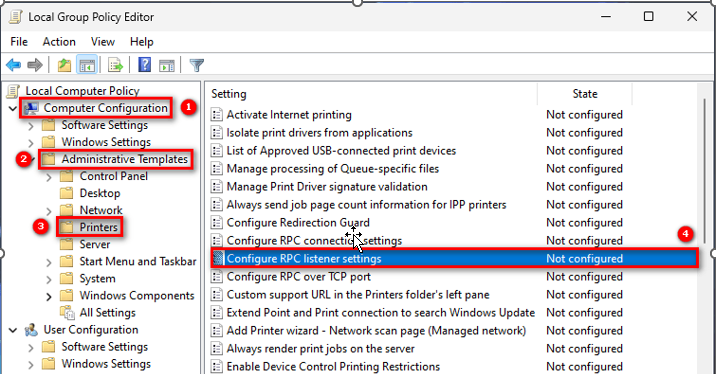
<span style="font-size:12pt"><span style="background:white"><span style="font-family:&#039;Times New Roman&#039;,serif"><strong><span style="color:rgb(68, 68, 68);">Computer Configuration</span></strong><span style="color:rgb(68, 68, 68);">&nbsp;–&nbsp;<strong>Administrative Templates</strong>&nbsp;–&nbsp;<strong>Printers</strong>, rồi click vào&nbsp;<strong>Configure RPC connection settings</strong></span></span></span></span><br  />
<img alt="" height="374" src="https://thienhashop.com/uploads/news/2023_05/image-20230518091557-2.png" width="716" /><span style="font-size:12pt"><span style="background:white"><span style="font-family:&#039;Times New Roman&#039;,serif"><span style="color:black"> </span></span></span></span><br  />
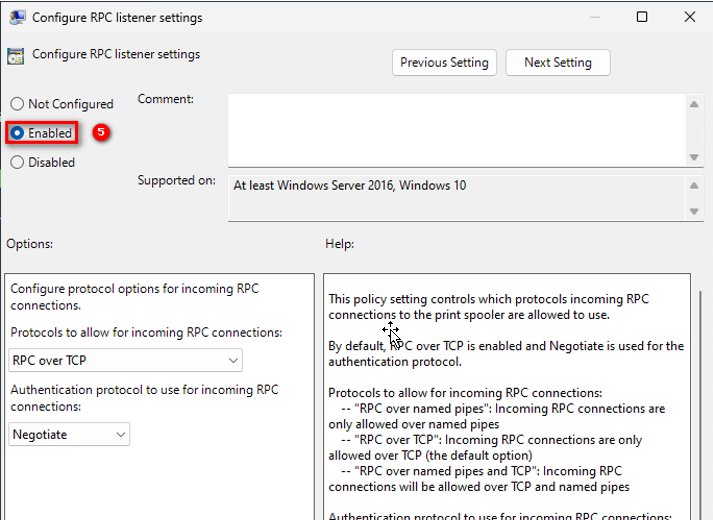
<span style="font-size:12pt"><span style="background:white"><span style="font-family:&#039;Times New Roman&#039;,serif"><span style="color:rgb(68, 68, 68);">Chọn&nbsp;<strong>Enabled</strong>&nbsp;rồi nhấn&nbsp;<strong>Apply&nbsp;</strong>và&nbsp;<strong>OK</strong>&nbsp;là hoàn thành. Bạn cần khởi động lại để áp dụng thay đổi và thử kết nối máy in.</span></span></span></span><br  />
<img alt="" height="520" src="https://thienhashop.com/uploads/news/2023_05/image-20230518091557-3.png" width="713" /><span style="font-size:12pt"><span style="background:white"><span style="line-height:107%"><span style="font-family:&#039;Times New Roman&#039;,serif"><span style="color:black"> </span></span></span></span></span>

<h2 style="margin-top:0in; margin-right:0in; margin-bottom:7.5pt; margin-left:0in; margin:2pt 0in 0in"><span style="font-size:13pt"><span style="background:white"><span style="line-height:39.0pt"><span style="font-family:&#039;Calibri Light&#039;,sans-serif"><span style="color:rgb(47, 84, 150);"><span style="font-weight:normal"><b><span style="font-size:34.0pt"><span style="font-family:&#039;Times New Roman&#039;,serif"><span style="color:rgb(51, 51, 51);">Cách 2: Sử dụng Registry Editor</span></span></span></b></span></span></span></span></span></span></h2>
<span style="font-size:12pt"><span style="background:white"><span style="font-family:&#039;Times New Roman&#039;,serif"><span style="color:rgb(68, 68, 68);">Để thay đổi registry nhanh bạn có thể mở CMD với quyền Administrator, sau đó dán dòng bên dưới và enter để thực hiện thay đổi.</span></span></span></span><br  />
<span style="font-size:12pt"><span style="background:white"><span style="line-height:107%"><span style="font-family:&#039;Times New Roman&#039;,serif"><strong><span style="color:blue">reg add “HKEY_LOCAL_MACHINE\SOFTWARE\Policies\Microsoft\Windows NT\Printers\RPC” /v RpcUseNamedPipeProtocol /t REG_DWORD /d 1 /f</span></strong></span></span></span></span><br  />
<span style="font-size:12pt"><span style="background:white"><span style="font-family:&#039;Times New Roman&#039;,serif"><span style="color:rgb(68, 68, 68);">Sau đó bạn cần khởi động để áp dụng thay đổi.</span></span></span></span><br  />
<br  />
&nbsp;
		</div>
	</div>
	<div id="footer" class="clearfix">
		<div id="url">
			<strong>URL của bản tin này: </strong><a href="https://thienhashop.com/news/huong-dan-phan-mem/ma-loi-chia-se-may-in-tren-windows-11-22h2-203.html" title="Mã lỗi chia sẻ máy in trên Windows 11 22H2">https://thienhashop.com/news/huong-dan-phan-mem/ma-loi-chia-se-may-in-tren-windows-11-22h2-203.html</a>

		</div>
		<div class="clear"></div>
		<div class="copyright">
			&copy; PHAN MEM THIEN HA
		</div>
		<div id="contact">
			<a href="mailto:phamhuy842005@gmail.com">phamhuy842005@gmail.com</a>
		</div>
	</div>
</div>
        <div id="timeoutsess" class="chromeframe">
            Bạn đã không sử dụng Site, <a onclick="timeoutsesscancel();" href="https://thienhashop.com/#">Bấm vào đây để duy trì trạng thái đăng nhập</a>. Thời gian chờ: <span id="secField"> 60 </span> giây
        </div>
        <div id="openidResult" class="nv-alert" style="display:none"></div>
        <div id="openidBt" data-result="" data-redirect=""></div>
<div id="run_cronjobs" style="visibility:hidden;display:none;"><img alt="" src="/index.php?second=cronjobs&amp;p=i6f8B96n" width="1" height="1" /></div>
<script src="https://thienhashop.com/assets/js/jquery/jquery.min.js"></script>
<script>var nv_base_siteurl="/",nv_lang_data="vi",nv_lang_interface="vi",nv_name_variable="nv",nv_fc_variable="op",nv_lang_variable="language",nv_module_name="news",nv_func_name="savefile",nv_is_user=0, nv_my_ofs=-4,nv_my_abbr="EDT",nv_cookie_prefix="nv4c_y8Y7D",nv_check_pass_mstime=1738000,nv_area_admin=0,nv_safemode=0,theme_responsive=1,nv_is_recaptcha=1,nv_recaptcha_sitekey="6LeSarIUAAAAAHRq6xkHwO6J0YYQOdMxgqKTXoL_",nv_recaptcha_type="image",nv_recaptcha_elements=[];</script>
<script src="https://thienhashop.com/assets/js/language/vi.js"></script>
<script src="https://thienhashop.com/assets/js/global.js"></script>
<script src="https://thienhashop.com/themes/default/js/news.js"></script>
<script src="https://thienhashop.com/themes/popovleather/js/main.js"></script>
<script src="https://thienhashop.com/themes/popovleather/js/bootstrap.min.js"></script>
</body>
</html>